
Home > Corporate Data Backup > Enterprise Data Backup Tools > Red Hat Virtualization Backup Software. RHEV Backup

Red Hat Virtualization has become a cornerstone platform for enterprise IT infrastructure, powering mission-critical workloads across government agencies, healthcare systems, financial institutions, and research organizations. As these environments grow in complexity and scale (up to 400 hosts per single RHV cluster), the need for sophisticated backup and recovery solutions becomes paramount.

It is important to mention that the development of RHV has stopped as of August 2020 and the product in question is only receiving maintenance updates since then – with its extended life phase updates being planned until 2026. However, there are still many environments that use it for various use cases, delaying the migration process to OpenShift container platform – the official successor of RHV.

While RHV offers robust virtualization features, protecting these environments requires specialized backup technologies that integrate natively with oVirt APIs and understand the unique characteristics of KVM-based virtualization. Ransomware threats have evolved to specifically target hypervisor layers, recognizing that compromising virtualization infrastructure provides access to dozens or hundreds of virtual machines through a single attack vector.

Enterprise RHV deployments require backup architectures that deliver more than periodic snapshots. Modern data protection strategies must provide agentless backup operations that don’t burden VM performance, support for multiple storage backends without vendor lock-in, and intelligent snapshot management that prevents storage bloat. At the same time, organizations are also facing the increasing regulatory scrutiny from GDPR, HIPAA, SOC 2, and sector-specific compliance frameworks that demand verifiable backup procedures, encrypted data protection, immutable storage capabilities, and detailed audit trails – requirements that native hypervisor tools simply cannot fulfill.
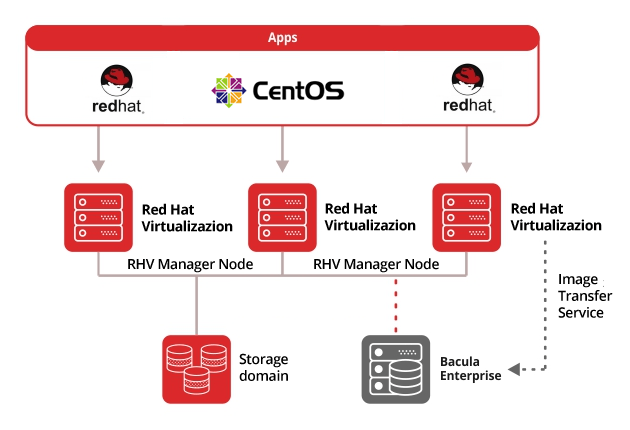
Operational resilience depends on backup solutions that guarantee both rapid recovery and data integrity. Whether recovering from malicious encryption attacks, hardware failures, configuration errors, or site-wide disasters, IT teams need backup and recovery infrastructure they can trust when minutes matter. Bacula Enterprise addresses these demands through purpose-built RHV integration, proven and reliable architecture, and the flexibility to protect heterogeneous virtualization environments from a single management platform.

red hat virtualization backup

Download Trial
Red Hat Virtualization Backup Whitepaper

Comprehensive RHV Backup Without Capacity-Based Pricing

Bacula Enterprise protects Red Hat Virtualization environments with a fundamentally different economic model: completely capacity-independent licensing. While competing solutions escalate costs as your data grows, Bacula’s straightforward pricing remains constant regardless of how many terabytes you protect. This approach delivers exceptional value for data-intensive organizations and Managed Service Providers (MSPs) managing multi-tenant RHV infrastructures, allowing unlimited expansion of virtual machine estates without triggering budget-breaking licensing increases.

Key Benefits of Bacula’s Red Hat Virtualization Backup Solution

Complete RHV Protection

  • Agentless Hypervisor-Level Backups – Operates directly through RHV APIs without requiring agents on individual virtual machines, reducing overhead and simplifying management
  • Full Image-Level Backup – Complete virtual machine protection with all VM disks, configurations, and metadata preserved for comprehensive recovery operations
  • Incremental and Differential Backup Levels – Efficient backup strategies capture only changed data, dramatically reducing backup windows and storage requirements
  • Storage Backend Agnostic – Works seamlessly regardless of underlying storage technology (NFS, iSCSI, Fiber Channel, local storage), providing complete flexibility
  • Transparent Snapshot Integration – Automatic RHV snapshot creation, management, and deletion synchronized with backup operations to minimize storage overhead

Flexible Recovery Options

  • Single File Restore Capability – Extract specific files or folders from image-level backups without recovering entire virtual machines, minimizing downtime and resource usage
  • Restore to Original or Alternate Locations – Recover VMs to the same cluster/storage or different destinations, facilitating migration, testing, and disaster recovery scenarios
  • VM Configuration Restoration – Restore with original settings or modify configurations on-the-fly, including network settings, resource allocations, and storage locations
  • Local Disk Restore Option – Restore VM images and configurations to local storage for offline processing, analysis, or alternative deployment scenarios

Advanced Operational Features

  • Failed Backup Recovery – Automatic detection and cleanup of previous failed backups or orphaned snapshots to maintain environment health
  • Connection Loss Protection – Sophisticated handling of backup cancellation and network interruptions to prevent snapshot accumulation
  • Password Obfuscation – Optional security feature to protect sensitive credentials in configuration files
  • Internal Snapshot Catalog – Maintains detailed tracking of all snapshots to prevent orphaned snapshots and ensure proper cleanup

Comprehensive Restore Capabilities

  • Flexible Restore Destinations – Restore VMs to original locations or different clusters and storage domains for disaster recovery and migration
  • VM Replacement or Cloning – Replace existing VMs or create new instances with custom naming for testing and parallel environments
  • Template Support – Full support for backing up and restoring RHV templates alongside standard virtual machines
  • Offline Processing Options – Extract VM configurations and disk images to local storage for analysis or alternative deployment

RHV Plugin Configuration & Management

Simple Yet Powerful Configuration

The RHV Plugin integrates seamlessly with Bacula’s FileDaemon architecture as a File Daemon module, requiring minimal configuration while offering extensive customization options for complex virtualization environments.

  • Plugin Installation Flexibility – Install on internal machines within the RHV environment or external systems, with Java-based architecture ensuring platform independence
  • Minimal Requirements – Runs on any operating system supporting the Bacula File Daemon and Java Virtual Machine (JVM version 8 or newer)
  • Authentication Methods – Support for both OAuth Authentication and HTTP Basic Authentication for flexible security configurations
  • API-Based Communication – Uses RHV’s Java SDK and REST API for hypervisor-level operations without requiring agents on individual VMs
  • Configurable Backup Methods – Choose between external backup (snapshot/clone/template) or internal backup (ProxyVM) based on performance and architectural requirements
  • Debug Capabilities – Comprehensive logging and debug options for troubleshooting backup operations and RHV integration issues

VM Selection & Targeting Methods

  • Tag-Based Discovery – Leverage RHV’s tagging system to automatically identify and backup VMs, with backup sets that dynamically adjust as tags are applied or removed
  • Pattern Matching – Java-compatible regular expressions enable complex name-based filtering with both include and exclude rules for precise VM targeting
  • Infrastructure-Based Selection – Target entire clusters or storage domains to align backup strategies with logical infrastructure organization
  • Direct Specification – Backup individual VMs by name or UUID when granular control is required
  • State-Aware Backups – Process VMs in any operational state (running, paused, shut off) with intelligent snapshot creation appropriate to each state
  • Exclusion Controls – Define both VM-level and disk-level exclusions to optimize backup scope and reduce unnecessary data protection overhead
  • Combined Logic – Mix multiple selection methods in a single backup job for sophisticated targeting strategies

Backup Process Configuration

The RHV Plugin offers two distinct backup methodologies, each optimized for different operational requirements:

  • External Backup Method – Performs disk downloads through RHV API using clone, snapshot, or template methods; slower than ProxyVM but requires no dedicated virtual machine infrastructure
  • Internal ProxyVM Backup Method – Utilizes a dedicated proxy virtual machine within the RHV environment for significantly faster backup operations through direct disk attachment
  • Incremental Backup with CBT – Changed Block Tracking (CBT) functionality identifies and backs up only modified disk blocks since last backup, dramatically reducing backup windows
  • Differential Backup Support – Preserves base snapshot for unlimited differential iterations without performance degradation, optimizing storage and restore speed balance
  • Backup Cache Feature – Optional functionality maintains VM backups in storage domains for accelerated restore operations when rapid recovery is critical
  • Automatic Quiescing – Transparent VM quiescing through RHV guest agent ensures application-consistent snapshots for databases and critical applications
  • Snapshot Management – Automatic creation, tracking, and removal of RHV snapshots prevents storage bloat while maintaining backup consistency

Restore Configuration Flexibility

  • Destination Control – Restore VMs to original cluster and storage domain, or specify different destinations for disaster recovery, migration, or testing scenarios
  • VM Naming Options – Replace original VMs or create new instances with custom names, facilitating clone operations and parallel production/test environments
  • Template Restoration – Support for restoring RHV templates alongside standard virtual machines for rapid VM provisioning scenarios
  • Selective Disk Restoration – Exclude specific disks from restore operations to reduce recovery time and data transfer when full VM restoration is unnecessary
  • Automated Power-On – Configure whether restored VMs automatically start or remain powered off, optimizing for different recovery scenarios
  • Disk Format Control – Specify virtual disk image format (COW or RAW) and interface type (IDE, VirtIO, VirtIO-SCSI, SPAR) during restore for performance tuning
  • Network Configuration – Provide MAC address lists and network settings to restore exact network configurations or create modified network topologies

Query Operations & Validation

  • VM Discovery – Query and list all virtual machines within the RHV environment for backup planning and validation
  • Cluster Information – Retrieve details about available clusters to plan backup strategies aligned with infrastructure organization
  • Storage Domain Query – List available storage domains and their characteristics for optimal backup and restore destination planning
  • Configuration Validation – Verify plugin configuration and RHV connectivity before executing backup operations
  • Snapshot Status Verification – Internal catalog tracks snapshot status to detect and remediate orphaned snapshots from failed operations

Core Enterprise Capabilities for Every Bacula User

Beyond RHV-specific functionality, Bacula Enterprise delivers comprehensive data protection capabilities that benefit all deployments, regardless of virtualization platform or infrastructure complexity.

Security & Compliance Architecture

Bacula Enterprise implements military-grade security throughout the backup infrastructure, ensuring data protection meets the most stringent requirements:

  • Encryption at Rest and In Transit – AES-256 encryption protects backup data during transmission and storage with configurable key management
  • Immutable Backup Storage – Write-Once-Read-Many (WORM) technology prevents unauthorized modification or deletion of backup data, critical for ransomware protection
  • Role-Based Access Control (RBAC) – Granular permissions system ensures users access only appropriate systems and data based on their organizational role
  • Comprehensive Audit Logging – Detailed tracking of all backup operations, restore activities, and administrative actions for compliance documentation
  • GDPR and HIPAA Compliance Features – Built-in capabilities support regulatory requirements including data retention policies, right-to-erasure, and secure data handling
  • Zero-Knowledge Architecture Options – Implement backup workflows where backup administrators cannot access actual backup content, ensuring data privacy

Intelligent Storage Efficiency

Bacula Enterprise employs advanced technologies to minimize storage requirements and optimize backup performance:

  • Global Endpoint Deduplication – High-performance deduplication technology operates at the block level, storing only unique data blocks and dramatically reducing storage requirements
  • Compression Algorithms – Multiple compression options balance CPU usage against storage savings for optimal resource utilization
  • Incremental Forever Strategies – Sophisticated backup scheduling minimizes data transfer and storage through intelligent change tracking
  • Sparse File Handling – Efficiently processes sparse files common in virtualized environments, backing up only allocated blocks
  • Network Bandwidth Optimization – Reduces data transfer requirements through intelligent block-level change detection and efficient network protocols

Universal Storage Flexibility

Bacula Enterprise supports virtually any storage destination, providing exceptional flexibility in backup architecture design:

  • Disk-Based Storage – Local disks, network-attached storage (NAS), storage area networks (SAN), and enterprise storage arrays
  • Cloud Storage Integration – Native support for Amazon S3, Microsoft Azure Blob Storage, Google Cloud Storage, and S3-compatible providers
  • Tape Library Support – Comprehensive tape automation for long-term retention, air-gapped storage, and compliance archiving requirements
  • Hybrid Storage Strategies – Combine disk, cloud, and tape targets in sophisticated backup workflows with automatic tiering and migration
  • Object Storage Compatibility – Direct integration with modern object storage systems for scalable, cost-effective backup repositories

Disaster Recovery & Business Continuity

Comprehensive disaster recovery capabilities ensure business operations can resume quickly following any disruption:

  • Bare-Metal Recovery – Restore complete systems from bare metal, recovering operating systems, applications, and data without manual reinstallation
  • Cross-Platform Recovery – Restore data between different operating systems and virtualization platforms for maximum flexibility
  • Replication Capabilities – Automatically replicate backup data to secondary locations for geographic distribution and additional protection layers
  • Near Continuous Data Protection (NCDP) – Reduce RPO to minutes for mission-critical systems through frequent automated backups
  • Verified Recovery Testing – Built-in capabilities for automated restore testing ensure backups are recoverable when needed

High-Performance Infrastructure

Bacula Enterprise’s performance optimization capabilities ensure efficient backup operations at enterprise scale without compromising system resources:

  • Network Resiliency Mechanisms – Sophisticated error handling and recovery protocols adapt to network conditions and maintain backup integrity during interruptions
  • Configurable Performance Tuning – Fine-tune backup operations through adjustable concurrent threads, bandwidth throttling, and intelligent resource allocation
  • Scalable Architecture – Support for deployments of any size to protect thousands of systems with centralized management and distributed execution
  • Snapshot & Image Integration – Minimize backup windows and storage requirements through efficient snapshot-based backups and incremental imaging
  • NCDP (Near Continuous Data Protection) – Reduces both RTO and RPO to just minutes for mission-critical virtual machines

Centralized Management & Operations

Comprehensive management capabilities provide IT teams complete visibility and control over backup operations across entire enterprise environments:

  • Intuitive Web-Based Interface (BWeb™) – Simplified job configuration with real-time monitoring dashboards, drag-and-drop scheduling, and extensive reporting capabilities
  • Command-Line Flexibility – Full-featured CLI for automation, scripting, and advanced administration alongside GUI options, mix and match as required
  • Multi-Tenant Architecture – Support for MSPs and large enterprises with isolated tenant environments, customizable branding, and role-based administrative access
  • Advanced Reporting & Analytics – Detailed backup status reports, performance metrics, storage utilization analysis, and compliance documentation with automated delivery
  • Enterprise Integration – Seamless connections with existing IT service management tools, LDAP/Active Directory authentication, and monitoring systems for unified workflow management
  • Comprehensive Discovery & Query – Automatic discovery of backup targets and granular query capabilities for efficient management of complex virtualized environments

Cost Efficiency & Licensing Advantages

Bacula Enterprise’s unique approach to licensing delivers substantial cost savings compared to traditional backup solutions:

  • No Capacity-Based Charges – Unlike competitors, Bacula does not charge by data volume, allowing organizations to scale their RHV infrastructure without incurring additional licensing costs
  • Flat, Predictable Pricing – Straightforward licensing model means easier budgeting and planning without surprises as your virtualized environment grows
  • Infrastructure Agnostic – No charges based on hypervisor choice, VM counts, or resource configurations
  • Enormous Savings at Scale – Organizations with large or rapidly growing data volumes realize particularly significant cost advantages over capacity-based competitors
  • MSP-Friendly Model – Service providers offer enterprise-grade RHV protection while maintaining sustainable profit margins

Frequently Asked Questions

What’s the difference between RHV snapshots and backups?

RHV snapshots are point-in-time disk captures that remain dependent on the source virtual machine and storage infrastructure. While useful for short-term rollback scenarios before system changes, they’re not true backups because they reside on the same storage as the source VMs, making them vulnerable to storage failures, ransomware attacks affecting the infrastructure, or accidental deletion. Enterprise backup solutions like Bacula create independent, immutable copies that can be stored on separate storage systems, cloud providers, or tape libraries, protecting against broader disaster scenarios including complete datacenter failures, storage corruption, and infrastructure-wide ransomware incidents.

What features should I look for in RHV backup software?

Essential features include agentless backup technology that operates through RHV APIs without performance impact, support for different backup levels (including Virtual Full backups), and granular file-level restore capabilities that don’t require recovering entire VMs. Security features like encryption, immutable backups, ransomware protection, and compliance with GDPR and HIPAA are increasingly critical. Look for solutions offering flexible storage destinations (disk, cloud, tape), automated snapshot management, pattern-based VM selection using tags and regular expressions, and Global Endpoint Deduplication to minimize storage requirements. The ability to restore VMs to different clusters or storage domains provides valuable flexibility for disaster recovery and migration scenarios.

How does Bacula handle RHV snapshot management?

Bacula automatically creates RHV snapshots at the beginning of backup operations for all VM disks, maintaining snapshot relationships and ensuring consistency. Once the backup completes successfully, Bacula removes these snapshots to prevent storage overhead accumulation. If a backup fails or is canceled, Bacula’s failed backup controls automatically detect and remove orphaned snapshots during the next backup attempt. The system also includes connection loss protection that attempts snapshot cleanup even if the backup process is interrupted, preventing the buildup of forgotten snapshots that could consume storage and impact VM performance.

Can I restore RHV backups to different storage or clusters?

Yes, Bacula provides complete flexibility in restore destinations. You can restore VMs to the original cluster and storage domain, or specify different destinations during recovery. This capability is particularly valuable for disaster recovery scenarios where primary infrastructure is unavailable, testing and development workflows that require VM clones in isolated environments, or migration projects moving workloads between clusters or datacenters. You can also restore VM disk images to local storage first for offline processing, file extraction, or conversion to other virtualization formats.

How does single file restore work for RHV VMs?

Bacula’s single file restore capability allows you to extract specific files or directories from image-level VM backups without recovering the entire virtual machine. The system mounts the backed-up disk images, navigates the guest file system (supporting Linux, Windows, NTFS, EXT3, EXT4, XFS, and other file systems), and extracts only the requested files. This dramatically reduces recovery time for scenarios like accidental file deletion, corrupted configuration files, or the need to access historical versions of specific documents. The process works through both the BWeb Management Suite GUI for ease of use and the command-line interface for automation and scripting.

Further help on Red Hat Virtualization backup:

  • Do you run other applications inside Red Hat virtual machines? Take a look at our database backup solutions.
  • Also using Microsoft virtualization as well as RHV? Take a look at our backup of Hyper V.
  • Don’t know about Bacula Enterprise’s especially wide range of backup and recovery capabilities? See the full product description.
  • BWeb™ Management Suite is a comprehensive GUI management suite for Bacula Enterprise that provides the data reports, core metrics and analysis that system administrators need to provide to managers.