Frequently Asked Questions
What is NDMP and why do NAS devices need it?
Network Data Management Protocol (NDMP) is an open standard that’s built to back up Network Attached Storage devices. Given that a regular backup agent can’t just run inside a proprietary NAS operating system like NetApp’s ONTAP or Dell’s PowerScale, there’s no room for it in there. What NDMP does is get around that by giving backup software a standard way to tell the NAS what to do, without needing an agent installed on the NAS itself.
How does NDMP differ from backing up over NFS or CIFS?
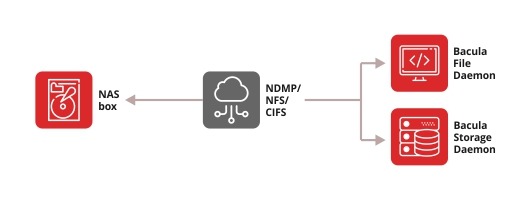
NFS and CIFS make the backup server open every folder, read every file, and check every ACL, one at a time, over the network. When the file count climbs into the millions, that process eats RAM and runs the backup past its window. NDMP has the NAS filer package its own data internally instead, in a format like Dump, Tar, or SMTAPE, and send the finished stream straight to the backup target, so that no outside process can touch the filesystem at all.
What’s the difference between 2-way and 3-way NDMP?
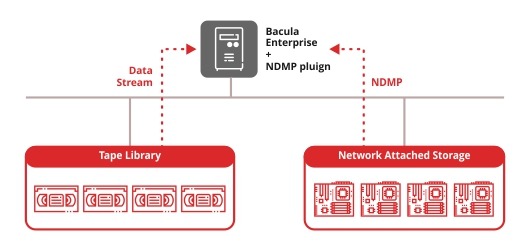
With the 2-way, or Direct NDMP, the filer connects straight to the tape library or backup target, usually over Fibre Channel or SCSI, and the backup server sends the commands, but the data itself never leaves that direct connection. By comparison, with the 3-way, or Remote NDMP, the data travels over the network, typically Ethernet, to a separate backup server, which then writes it wherever it’s going, disk, tape, or cloud. This is the mode Bacula recommends for production deployments.
Does NDMP support incremental and differential backups?
Yes, with a slight asterisk. It’s the filer that does the actual change-tracking, not the backup software itself. NAS operating systems use dump levels, 0 through 9, to detect what’s changed since the last run. The backup software’s job here is simply to receive the stream and log whichever level it belongs to.
Can you restore a single file from an NDMP backup, or only the whole volume?
Yes. Bacula’s plugin does this through an automatically generated history file, called HIST, built during the backup itself with no separate setting to turn on beforehand. Restoring one file still triggers a full internal read of the dump to locate it. On a small dump that’s nothing. That said, on a multi-terabyte one, that read takes much longer,, even though what you get back on disk is just the one file you specifically requested.
Is NDMP secure?
Yes, in the sense that Bacula contains the risk even when the filer doesn’t. The File Daemon receiving the NDMP stream has no interface to the backup storage itself, so even a compromised filer can’t reach the backups sitting behind it. CRAM-MD5 authentication and configurable TLS encrypt every connection between Bacula’s own daemons, and BGuardian scans the environment for weak configurations, an unencrypted NDMP channel included, and detects the risk before it has a chance to evolve.