Chat with us, powered by LiveChat
Home > Corporate Data Backup > Enterprise Plugins > Incremental Accelerator for NetApp

On modern NetApp volumes with millions of small files, legacy backup tools oftentimes spend hours just detecting modified files. As a result, jobs overrun the backup window and keep reading from the filer into production hours, whilst the backup competes with your users for the same storage.

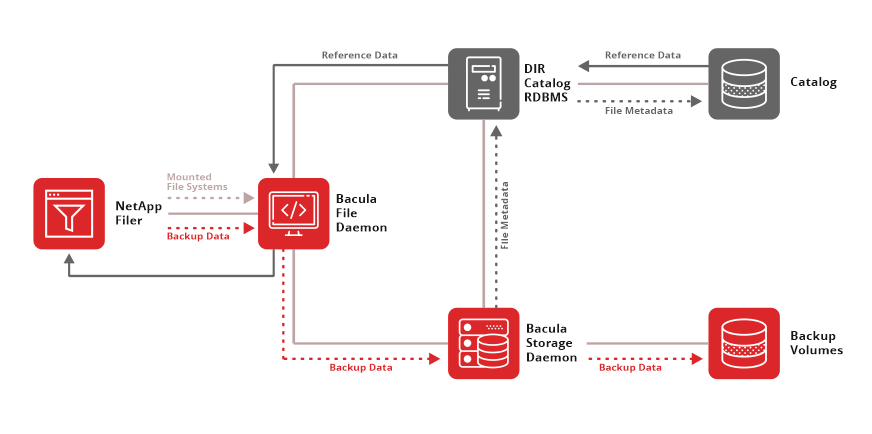
Bacula’s NAS backup accelerator tool gives you shorter Incremental jobs that are far more likely to finish inside the backup window. The Incremental Accelerator for NetApp plugin gets the list of modified files from NetApp snapshots instead of searching for them, and it copies only those files over standard NFS or CIFS shares.

On top of that, the plugin deletes old snapshots once it no longer needs them, and Bacula Enterprise protects the backups themselves with immutable storage and encryption.


This plugin is available on RHEL 5 and 6 (32/64 bits), SUSE 11 (64 bits)  and supports NetApp 7.3.6, 8.0 and 8.1.

Key Features of the NetApp Incremental Backup Accelerator

  • Snapshot-Based Change Detection: Bacula’s NAS backup accelerator compares NetApp snapshots to find every file modified since the last backup. That removes the directory-by-directory crawl from Incremental jobs on high-file-count volumes.
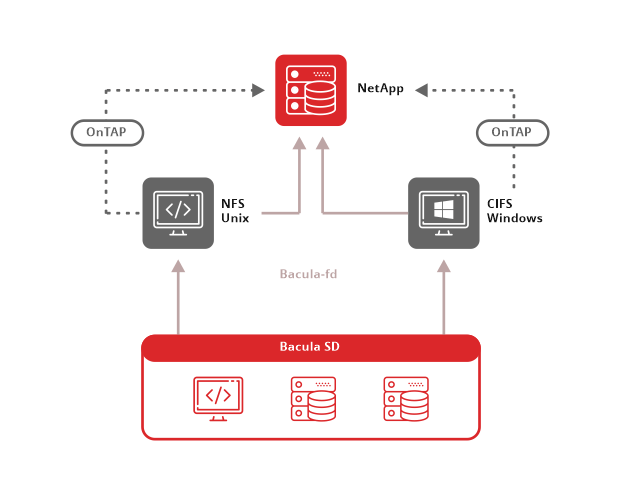
  • Separate Control and Data Paths: Bacula gets the change list from NetApp’s management interface and reads file data over the NFS or CIFS shares you already run.
  • Self-Pruning Snapshot Chain: Bacula keeps 3 to 4 snapshots per volume and prunes each one once the next change list no longer needs it.
  • Automatic Volume Discovery:  Bacula pulls the volume list straight from the filer, which keeps hardcoded volume paths out of your Fileset. The volume, include, and exclude options then trim the scope.
  • 7-Mode and Cluster-Mode Support: One plugin handles 7-mode and c-mode filers, and the vserver option points it at the right SVM on a cluster. That lets a mixed NetApp estate run on a single backup plugin instead of a separate tool for each ONTAP generation.

Benefits of the NAS Backup Accelerator Tool

  • Shorter Incremental Windows: You can stop backup operations from overlapping with user traffic when production hours commence. Bacula executes your incremental backups rapidly and completes the job without coinciding with active system operations.
  • Self-Limiting Snapshot Retention: The plugin prevents resource bloat on the filer by actively pruning its own snapshot registry to maintain a strict limit of 3 to 4 snapshots per NetApp volume.
  • Granular Single-File Restores: Target and extract an isolated file nested within a NetApp volume without waiting for a full-volume restore to finish.

NAS Backup Accelerator Tool Features & Version Support

Backup Capabilities

  • Snapshot-Driven Change Detection: Incremental jobs get their file lists from the differences between NetApp snapshots and skip the filesystem crawl.
  • Full Backups: Full jobs run through the same plugin and back up every file on the selected volumes.
  • Volume-Level Scoping: The volume, include, and exclude plugin options decide which volumes a job covers, and include accepts wildcard patterns such as vol1*.
  • Multiple Jobs per Volume: A unique key value gives each job its own snapshot registry. Several jobs can then back up the same volume, or same-named volumes in different contexts, without their snapshots colliding.
  • Change Tracking with Accurate Mode: Accurate mode records directory moves and deletions at backup time. With that record in place, restores rebuild the source directory structure correctly.

Restore Capabilities

  • Host and Volume Restore Tree: Restored files will appear under /<netapp host name>/<volume>/, so /etc/passwd from volume vol0 on filer netapp-box shows up as /netapp-box/vol0/etc/passwd. That layout tells you which filer and volume each file came from.
  • File and Directory Selection: You can mark individual files or directories in the restore tree and restore only those files, without having to restore the whole volume.
  • Virtual Restore Tree: Restores present files in a virtual filesystem laid out as /<netapp host name>/<volume>/<files and directories>.

Operational Features

  • Plugin-Only Fileset: The Fileset Include section must contain only the netapp-hfc plugin line. Mixing other plugins or regular files with it isn’t supported.
  • Client Placement: Bacula Systems advises installing the plugin on the Client that runs on your Storage Daemon host. That placement keeps File Daemon to Storage Daemon traffic off the network.
  • Accurate Mode Resource Cost: Accurate mode adds memory load on the File Daemon and CPU load on the catalog database and puts no load on the NetApp itself. Volumes with millions of files need File Daemon hardware sized for that load.
  • Full-Level Estimate Warning: An estimate run at the Full level, which is the default, puts heavy load on a filer that holds many files. Set the level explicitly before you run estimate on a large filer.

Platform and Version Support

  • Bacula Enterprise Version: The plugin requires Bacula Enterprise 6.0.6 or later.
  • NetApp Releases: NetApp 7-mode releases 7.3.6, 8.0, 8.1, 8.2, and 8.3, along with all c-mode versions are supported.
  • NetApp SDK Requirement – Installation requires the Perl libraries from the NetApp Manageability SDK, which you can download from the NetApp Support site.

Bacula Enterprise Cybersecurity Features

The NetApp plugin runs inside the Bacula Enterprise backup and recovery platform, and the platform’s security controls protect the Director, Storage Daemons, catalogue, and backup volumes that hold your NAS data. These controls align directly with the NIST Cybersecurity Framework 2.0.

Threat Detection and Identification

  • ClamAV Antivirus Scanning: Verify jobs can pass backed-up files to the ClamAV daemon, which scans them away from the source system.
  • BGuardian Anomaly Analysis: BGuardian flags possible backup poisoning by tracking deviations in job size, file count, and duration, and it also reports weak passwords and insecure configuration settings.
  • SIEM Integration: Bacula ships a Wazuh package with a log decoder and rule set, and other SIEM tools can consume Bacula output through syslog, log files, or the SQL catalog.
  • Hash-Based Malware Detection: Backup, restore, and Verify jobs can check file hashes against a malware database, and abuse.ch is the default source.

Incident Response and Recovery

  • Compromised Resource Isolation: Administrators can disable jobs and clients suspected of compromise, and the Storage Groups feature can redirect workload away from a disconnected storage host.
  • Air-Gap-Ready Architecture: Bacula runs fully offline, and you can place the Director and Storage Daemons in segmented networks that clients cannot reach.
  • Cross-Platform Restores: Bacula can restore data to a different client or operating system, such as an isolated Linux host, where reinfection is much harder.

Backup Infrastructure Protection

  • TLS 1.3 Daemon Encryption: Bacula encrypts traffic between the Director, File Daemon, Storage Daemon, and bconsole by default through TLS 1.3 with automatic PSK.
  • FIPS 140-3 Compliance: Bacula Enterprise supports FIPS 140-3 through its OpenSSL-FIPS cryptographic module, and the FIPS Require = yes directive forces each component to use a FIPS-compliant crypto library.
  • Immutable Volumes: Bacula sets Append Only and Immutable attributes on disk volumes and works with NetApp SnapLock, Data Domain Retention Lock, HPE StoreOnce immutability, WORM tape, and S3 Object Lock.
  • Encryption at Rest: The Storage Daemon can encrypt volumes with AES-128-XTS or AES-256-XTS, and the File Daemon can encrypt and sign file data before the data leaves the client.
  • LDAP and Active Directory Integration: BWeb and console authentication can connect to LDAP and Active Directory, and ACLs still control what each directory user can do.

FAQs

What is a NAS backup accelerator?

A NAS backup accelerator is software that speeds up backups on network-attached storage by finding modified files without scanning the entire filesystem. It replaces the slow directory-by-directory walk with a faster source of change information. The Bacula Enterprise Incremental Accelerator for NetApp is a File Daemon plugin that compares the previous backup snapshot with a new one, builds a list of every changed file, and has Bacula back up only those files.

What are the key advantages of a NAS backup accelerator?

The primary advantage is a reduced Incremental backup on volumes containing a large number of files, as the accelerator bypasses the complete directory scan. Omitting the walk typically results in significantly fewer metadata requests to the filer, and reduced job durations decrease the likelihood that a backup is ongoing when your users begin their workday.

What methods can I use to accelerate incremental backups on a NetApp NAS containing millions of files?

Substitute the filesystem traversal with change identification based on snapshots. The Bacula Enterprise Incremental Accelerator for NetApp requests the filer for modifications since the last backup snapshot, and Bacula subsequently backs up solely the altered files via NFS or CIFS. Bacula Systems created the plugin for NetApp NAS systems that support a vast number of files.

Is Bacula compatible with NetApp cluster mode (c-mode) backups?

Indeed. The Bacula documentation specifies compatibility with all c-mode versions and 7-mode releases 7.3.6, 8.0, 8.1, 8.2, and 8.3. In a c-mode system, you include the vserver option in the plugin command. You might also have to establish a user account on the SVM that is being backed up.

What is the number of snapshots that the NetApp incremental accelerator retains for every volume?

The plugin maintains 3 to 4 snapshots for each volume, based on your backup strategy. Those images enable the plugin to determine the alterations since the previous backup. When a snapshot is deemed unnecessary, the plugin removes it.

Further help:

  • View Bacula Enterprise’s corporate backup and recovery features.
  • BWeb™ Management Suite is a comprehensive GUI management suite for Bacula Enterprise that provides the data reports, core metrics and analysis that system administrators need to provide to managers.
  • Training is available in different locations, depending on the Certified Bacula Systems Training Center you choose.

(21 votes, average: 5.00 out of 5)