Chat with us, powered by LiveChat
Home > Corporate Data Backup > BGuardian

Spot Backup Security Risks Before You Need to Recover

  • Flag Unusual Backup Activity
  • Identify Insecure Configurations
  • Find Gaps in Backup and Restore Testing

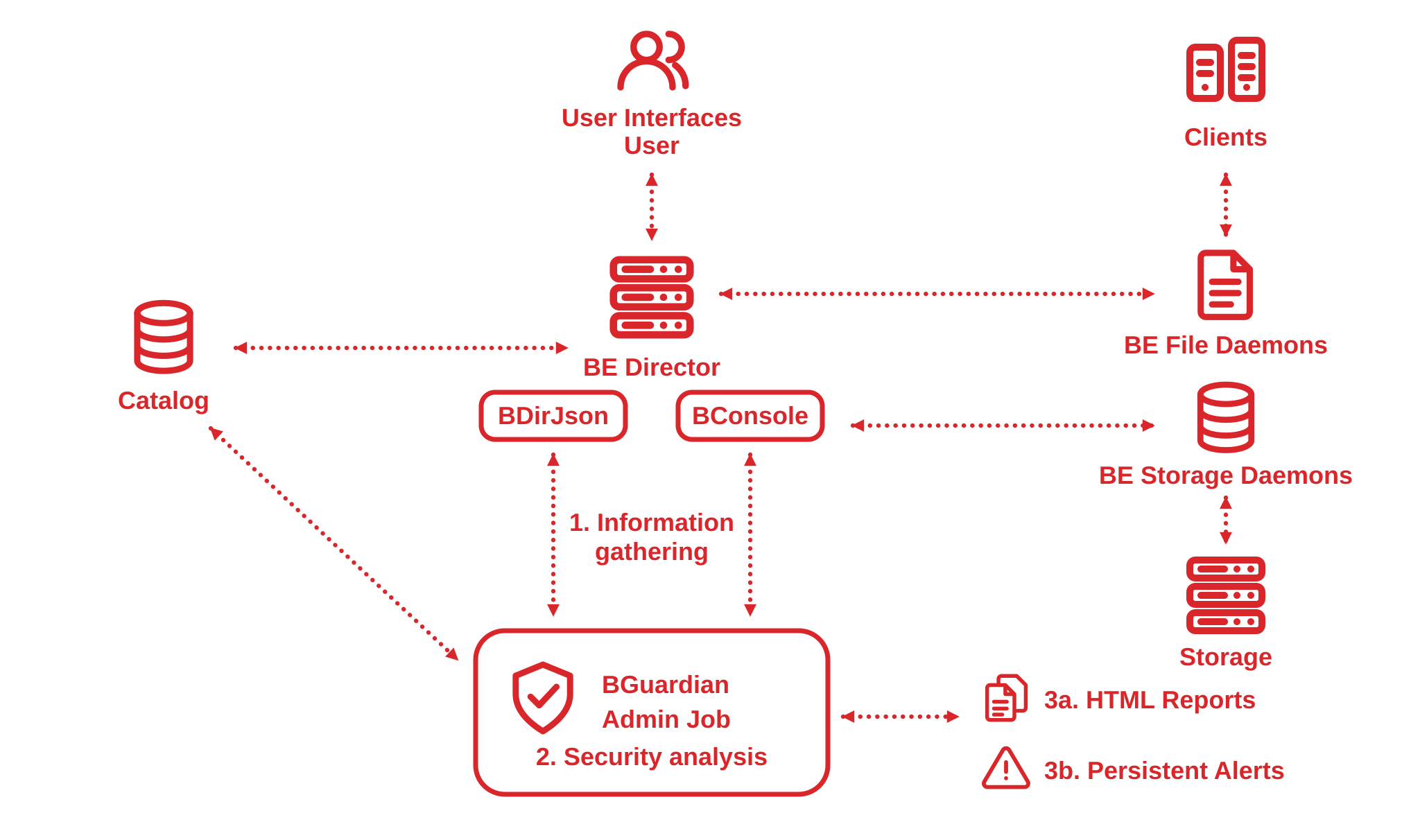
BGuardian draws on Bacula Enterprise’s extensive architectural visibility to deliver deep, powerful backup security analysis. Correlating configuration, component health and detailed job history, it exposes security weaknesses, suspicious deviations that may indicate ransomware or backup poisoning, recurring failures and gaps in recovery readiness. Actionable reports and persistent alerts give your team a significant advantage in identifying threats, prioritising investigations and strengthening protection.

See What a Successful Backup Job Can Miss


A successful job status tells you that a job finished. You still need to know whether each virtual machine and database has a recent backup, whether copies reached a second storage tier, and whether anyone has tested a restore. BGuardian helps backup administrators find those gaps in Bacula Enterprise.

It also flags changes in job size, file count, or runtime that can indicate backup poisoning. An unexpected change may come from ransomware activity, a workload change, or routine maintenance. The report shows which job metric changed so your team can investigate.

Run checks on demand or schedule them through a Bacula Admin Job. Review findings in HTML, process JSON reports with other tools, and use Bacula Events to track when alerts open or clear.

Key Features of BGuardian

#

Backup Poisoning Indicators

Compare job size, file count, and duration with historical patterns. Flag significant deviations and tune thresholds for workloads with expected swings.

#

Security Configuration Assessment

Check for weak or reused passwords, permissive configuration files, and BWeb users without two-factor authentication. Review where encryption is used and flag cloud storage devices configured without it.

#

Backup Failures and Coverage Gaps

Find repeatedly failing jobs, successful full backups that saved no data, and virtual machines or databases overdue for a successful backup.

#

Copy, Verify, and Restore Checks

Identify jobs with no copy to a second storage tier, no recorded verification, or no restore attempt. Check whether the Bacula catalog and configuration have been backed up recently.

#

Backup Infrastructure Health

Check daemon reachability, available storage space, and Global Endpoint Deduplication errors. Review PostgreSQL catalog maintenance and configuration.

#

Security Events and Malware Findings

Review recent Bacula security events such as failed console connections. Surface malware findings already recorded by Bacula jobs.

#

Reports for Administrators and Tools

Use HTML reports to review findings grouped by severity, or process JSON output with other tools. With BWeb configured, report links can open relevant job logs and configuration pages.

#

Persistent Alerts

Group related findings into alerts that carry across runs. Bacula Events record when an alert opens or clears.

Explore Backup Security Resources

Ransomware Protection Whitepaper 

See how Bacula approaches ransomware protection for backup and recovery.

Zero Trust Backup Whitepaper 

Explore zero trust design for backup and recovery in defense environments.

See What a BGuardian Report Shows
Start with the severity summary, then expand a finding to see which jobs were flagged and why. For a backup anomaly, the report shows whether job size, file count, or duration changed significantly.
Explore the Sample BGuardian Report

Frequently Asked Questions About BGuardian

What is BGuardian?

BGuardian is a powerful Bacula Enterprise Director plugin that checks backup activity, configuration, and infrastructure health. It reports findings and maintains alerts across runs.

Can BGuardian detect ransomware in backups?

BGuardian flags unusual backup patterns that may indicate ransomware activity. Use those findings alongside malware scans and other security evidence to determine the cause.

Does BGuardian verify that a backup can be restored?

BGuardian checks Bacula job history for verification and restore activity. Use Bacula Verify jobs to verify backups and perform test restores to validate recoverability.

How often can BGuardian run?

Run it on demand or schedule it as a Bacula Admin Job. You can schedule different sets of checks separately and tune the thresholds for deviation analysis.

What does BGuardian require?

BGuardian runs on the Bacula Enterprise Director host. It requires Java 11 or later and a PostgreSQL Bacula catalog.

See BGuardian in Your Backup Workflow
Talk with Bacula Systems about the checks you want to run and how BGuardian would fit your Bacula Enterprise environment.
Request a BGuardian Demo

Further Help with BGuardian


(13 votes, average: 5.00 out of 5)