
Backup across multiple security zones should preserve the trust boundaries enforced by the production network. Use zone-specific credentials, narrowly scoped network flows, separated control and data traffic and independent recovery paths. Where persistent cross-zone connectivity is prohibited, use controlled replication, one-way transfer or offline media instead of weakening network segmentation.
This note is for infrastructure and security architects and senior administrators engaged in enterprise backup architecture in deliberately segmented environments, such as defense, aerospace, research, operational technology, critical infrastructure and enterprises running networks across different classification levels or trust domains. These can be classified and unclassified network domains, corporate information technology versus operational technology plant floor and similar configurations.
The focus is on backup knowledge and solving one design problem. Specifically, this note is about protecting zones without creating new pathways between them.
Key Takeaways
- Multi-zone backup should preserve existing security-zone boundaries.
- Use zone-specific privileged credentials and narrowly scoped firewall rules.
- Separate backup control traffic from backup-data traffic.
- Maintain local recovery capability where zones must operate independently.
- Test recovery with cross-zone connectivity, centralized identity and shared catalogs unavailable.
Why Is Backup Difficult Across Multiple Security Zones?
Centralized backup architectures can create structural security risks in segmented environments. They often rely on persistent connectivity and elevated privileges across zone boundaries, which can turn the backup system into a potential path for lateral movement.
Centralized backup architectures, such as single-console enterprise backup suites and centralized appliance pull architectures, assume the backup server reaches every client, clients return data to shared storage, and all can access the management plane.
That assumption works in a flat network. However, it doesn’t work in deliberately segmented environments, such as military tactical networks & defense research enclaves and operational technology & supervisory control and data acquisition industrial environments.
Backup across security zones should preserve environments with enforced network segmentation. When backup makes the corporate information technology zone connected to a restricted engineering environment, segmentation starts working against the backup system.
Backup traffic makes the situation complicated. Specifically, this refers to large, regular, authenticated connections moving across zone boundaries on a predictable schedule. Also, this refers to high-privilege service account credentials on both ends and stored copies of everything touched.
When a backup component is compromised, it enables access to data from zones that couldn’t be reached through the production network.
As of October 2026, NIST SP 1339 (June 2026) recommends creating OT backups regularly, testing them and reviewing them during recovery exercises.
Why Can Backup Infrastructure Create Cross-Zone Risk?
A backup server featuring authorized connections to multiple zones can communicate across those zones via permitted paths. When the server gets compromised, existing authorized channels get into every zone served. And this is caused by positioning, not by misconfiguration.
Why Should You Define Trust Boundaries Before Choosing Backup Software?
Map trust boundaries, permitted connection direction and prohibited communication paths before choosing or configuring backup products. First, design the architecture; then, the product will fit within it.
NIST Zero Trust Architecture describes eliminating implicit trust based simply on network location. NIST OT Backup Quick Start Guide (SP 1339) is the Operational Technology (OT) Backup Quick Start Guide published by the National Institute of Standards and Technology (NIST) and the National Cybersecurity Center of Excellence (NCCoE). This guide identifies that organizations should establish clear procedures for backup and ransomware recovery.
NIST Zero Trust Architecture (SP 800-207) is an official publication by the National Institute of Standards and Technology that defines Zero Trust Architecture (ZTA) and creates guidelines so that cybersecurity can shift away from traditional, perimeter-based network defenses.
There is no implicit trust granted based solely on physical or network location. Here is an authoritative government source covering protected/offline/immutable recovery copies.
A common error is first building trust relationships and only then choosing a backup platform.
Product capabilities, such as global inline deduplication and compression and multi-cloud snapshots and storage array orchestration, are less essential than understanding which communications are permitted between zones. Backup products can’t override a correctly enforced firewall rule.
- Before any backup configuration, identify security zones and their classification level.
- Next, define which systems may connect with others.
- Then, separate control-plane from data-plane traffic while doing analyses.
- Moreover, identify the places where credentials are allowed to exist.
- Finally, map prohibited paths where the backup design can operate.
Credential location is a trust boundary decision. A backup service account featuring read access to Zone C systems shouldn’t exist on a system with connectivity to Zone A.
Credential scope and credential location represent trust boundary decisions.
Guidance reference reviewed October 2026: NIST SP 800-207, published August 2020.
Which Backup Architecture Models Work Across Multiple Security Zones?
Models aren’t universally correct. The right pattern depends on classification levels, permitted communication paths, recovery requirements and the operational cost required for each zone’s isolation. Multi-zone backup shouldn’t create new cross-zone access paths.
Five established patterns enable backing up across zone boundaries, such as corporate information technology network vs. industrial operational technology plant floor and general production cloud enclaves vs. Payment Card Industry Data Security Standard (PCI-DSS) payment processing environments.
Each of them represents a trade-off between operational simplicity and security isolation.
| Model | Description | Best For | Primary Risk |
|---|---|---|---|
| Centralized | One backup server uses cross-zone firewall rules to serve all zones | Zones with varying sensitivity levels but with the same trust level | Single compromise point with authorized access to every zone |
| Fully distributed | Each zone comes with its own backup server, storage and catalog. Data doesn’t cross zone boundaries. | Environments where data always stays within its zone. | Infrastructure duplication; makes cross-zone recovery complicated |
| Hierarchical | Zone-level backup infrastructure with optional replication to a central repository through a controlled gateway. Backup infrastructure shouldn’t weaken existing trust boundaries. | Environments that need local recovery and centralized retention | The gateway turns into a high-value cross-zone target, which is a security-critical gateway with access to multiple zones. |
| Controlled replication | Zone-local backup; data transferred through a gateway, data diode or scheduled firewall opening. A data diode is a hardware-based network security device enabling one-way data transmission between two networks. | Environments with prohibited persistent cross-zone backup connections | Transfer window serves as an attack surface when left without tight control. Attack surface is the systems, services and network paths an attacker could potentially exploit. |
| Fully separate | Components aren’t shared at any layer. Features separate servers, storage, catalogs, administration paths and recovery procedures. | Absolute isolation requirements; classified from unclassified separation | Highest operational cost; backup capability with full duplication |
Which Side Should Initiate the Backup Connection?
The preferred connection direction depends on the trust boundary. In same-trust zones, it may be appropriate to use standard Director-initiated Bacula connections. In restricted zones, reduced inbound connectivity can result in a reduced authorized attack surface, and the selected Bacula configuration should be supported and tested.
In a conventional Bacula deployment, the Director builds connections to both the File Daemon (on the client) and the Storage Daemon (on the storage target). The backup data stream navigates between the File Daemon and the Storage Daemon. The Director isn’t in the data path.
In environments where zones have the same trust level, and the Director can build inbound connections to clients, the standard model can operate without undergoing modifications.
When a zone boundary doesn’t allow inbound connections to come from the backup network, the standard Director-initiated connection to the File Daemon may not have permission.
Bacula supports File Daemon-initiated connectivity through its ConnectToDirector configuration. Confirm availability and behavior against the Bacula version deployed in your environment, reducing the inbound access requirements into the restricted zone. This requires specific planning and testing, which also refers to scheduling and job control behavior.
How Does Backup Connection Direction Affect Cross-Zone Risk?
Pivot risk is the risk of using an authorized backup connection to reach another zone. Which side should initiate the backup connection?
If the Director builds connections to Zone C clients using an authorized rule, a compromised Director has an existing permitted path into Zone C. If Zone C File Daemons build outbound connections, that inbound surface gets reduced. The firewall controls what can be kept under control, and the architecture determines what is authorized.
Bidirectional connectivity across a zone boundary enables the number of permitted cross-zone connection paths to grow in both directions. Specific operational requirements should justify bidirectional firewall rules associated with backup traffic across a high-sensitivity boundary without leaving them as default.
How Do You Prevent Backup Infrastructure From Creating a Cross-Zone Path?
A backup server connected to multiple zones can route traffic between them using its interfaces. Prevent this using explicit network-layer controls, separate interfaces per zone, disabled inter-interface routing and a minimal service footprint.
A backup server featuring authorized connections to multiple zones serves as a bridge between them. The server uses routing, not misconfiguration. If Zone B and Zone C traffic arrives on different interfaces, routing between them should be disabled or be governed by a specific policy.
Each zone should have a separate network interface. Minimize services on backup infrastructure. Treat each as an additional attack surface.
Administration should rely on a dedicated management path without traversing production zone networks.
How Should Backup Control and Data Traffic Be Separated?
Bacula’s architecture is structurally designed to separate the control and data planes. The control plane carries job-management and orchestration traffic. The data plane carries backup and restore data.
The Director keeps scheduling and job orchestration under control without carrying backup data. The File Daemon sends data to the Storage Daemon. There is no Director in the data path.
The firewall has specific implications: Director→File Daemon (Transmission Control Protocol 9102) and Director→Storage Daemon (Transmission Control Protocol 9103) carry job control. The File Daemon→Storage Daemon path carries the backup stream.
It’s possible to restrict management console access to the Director (TCP 9101) to a dedicated management network without affecting backup data flows.
The Director can remain in the Backup Zone using narrow rules for production zones (job orchestration only). Storage Daemon rules govern the higher-volume data path separately.
When a single broad rule is used for both, the architectural value of the separation gets discarded. Management traffic, including console access and catalog queries, should travel through a dedicated path. They shouldn’t travel through interfaces shared with backup data.
Firewall Flow Reference table
| Source | Destination | Default port | Purpose | Direction |
| Console | Director | TCP 9101 | Management | Console → Director |
| Director | File Daemon | TCP 9102 | Job control | Director → FD |
| Director | Storage Daemon | TCP 9103 | Storage control | Director → SD |
| File Daemon | Storage Daemon | TCP 9103 | Backup data | FD → SD |
How Should Backup Credentials Be Isolated Across Security Zones?
Use separate privileged backup credentials for security zones. Ensure compromising credentials in one zone doesn’t automatically provide authenticated access to another.
Backup service accounts in Zone C should differ from those in Zone B and Zone A. When credentials are shared, a single compromise can extend authenticated reach to every zone using those credentials.
Recovery dependencies on centralized identity infrastructure, such as Active Directory, Lightweight Directory Access Protocol, and external Identity Providers (IdPs), represent a common architectural failure point. IdPs represent a central system like Okta, Microsoft Entra ID, or Google Identity that manages user accounts, authentications and access permissions.
If Zone C gets authenticated against Zone A’s identity provider, Zone A can help Zone C recover. Local service accounts having independently managed credentials eliminate that dependency.
Use a specific schedule to rotate backup service account credentials. Answer “Can Zone C be restored with an offline central identity provider?” before an incident.
How Should Backup Data Move Between Security Zones?
Choose the transfer mechanism based on the sensitivity level of the zone. A restricted zone means the transfer mechanism must minimize its persistent network surface. Specifically, this refers to direct transfer through gateways and time-limited openings, and offline physical media where a cross-zone network path is prohibited or unacceptable.
When backup data must cross a zone boundary for retention or disaster recovery, the transfer method is part of the security architecture.
Direct transfer using an authorized firewall rule is the simplest option. However, it builds a persistent pathway with rules specifying exact addresses and ports. These rules must be logged.
A controlled gateway can limit the effect of a compromise when its permitted destinations, protocols and functions are tightly restricted.
Store-and-forward with time-limited firewall openings preserves local recovery capability, whether the transfer window is open or not.
Offline physical-media transfer avoids a network connection between the source and destination zones during transfer. Highly isolated zones may accept only this option. Isolated zones should have a defined recovery path when shared services are offline.
Backup data should be encrypted before it crosses a zone boundary. No one should be able to access decryption keys outside the source zone.
Why Can Cross-Zone Recovery Be Harder Than Backup?
Even if design successfully writes backup data across zones, it may fail during disaster recovery. Recovery is based on a functional target environment, identity services, network connectivity and a working catalog. These dependencies can prevent recovery even when the backup data itself is intact. Recovery must be tested with cross-zone dependencies unavailable.
Zone integrity is also associated with recovery. Specifically, if Zone C data is restored into Zone A, the way data has left its zone may not meet the requirements of the boundary. Zone integrity and data integrity aren’t the same constraints.
Answer these questions before an incident:
- If there is no cross-zone connectivity, can each zone recover independently?
- If the backup catalog is unavailable, can recovery proceed from offline media?
- Is local credential backup defined and tested for recovery if central identity services are unavailable?
- Is local storage current enough for useful recovery with a closed cross-zone firewall?
- Can sites operate and recover independently without a wide area network?
What Is the Difference Between Backup Availability and Recoverability?
Writing successfully to storage is regarded as availability. When data recovers correctly to the right zone, through working authentication, within the required time, with the cross-zone firewall being closed and central identity being offline, this is about recoverability. It’s essential to focus on designing and testing recoverability, not merely availability.
A system that writes to storage is considered available. A system is considered recoverable when it uses working authentication to restore the correct data to the correct zone into a functional target within the required time and with the cross-zone firewall being closed and central identity being offline. These are different properties. The second one must be tested.
What Does a Three-Zone Backup Architecture Look Like?
This scenario is about a coherent multi-zone design where the recovery capability of zones matches their isolation level. Specifically, Zone A depends on the Backup Zone, and Zone B recovers locally or from the Backup Zone. Zone C recovers from local components without depending on external systems.
The following reference architecture demonstrates a coherent multi-zone design. Zone C is isolated, so it doesn’t have inbound or outbound network paths to external zones. Control and data-plane functions are local to Zone C. Data leaves through physical tape transfer.
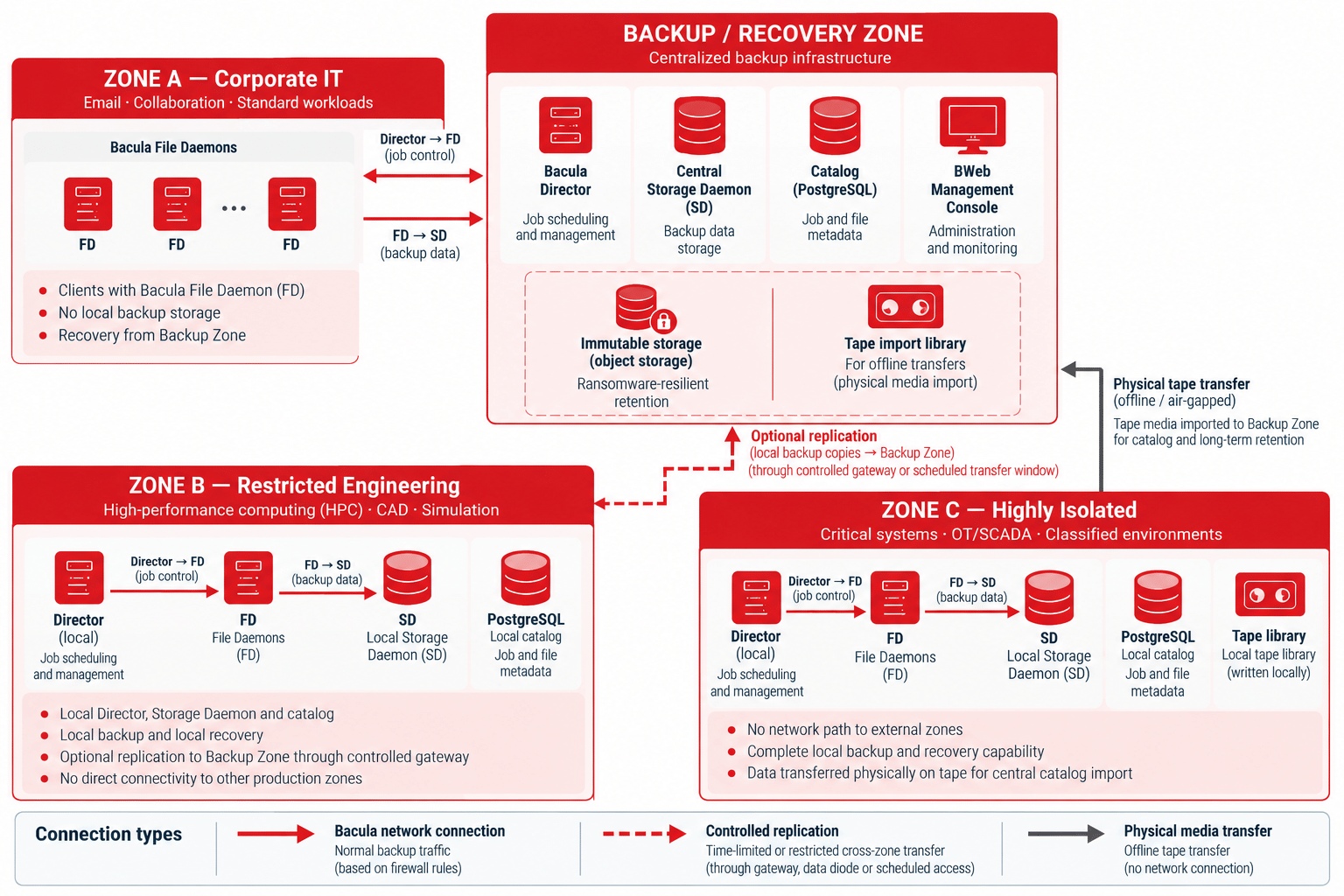
A catalog replica represents a synchronized copy of some or all of the primary catalog’s records, kept on a separate database instance.
Zone A: Corporate IT
File Daemons transfer data outbound to the central Storage Daemon. The Director uses an authorized firewall path to schedule jobs. There isn’t local backup storage. When there is connectivity, Zone A can recover from the Backup Zone.
Zone B: Restricted Engineering
Zone B protects high-performance computing clusters, simulation workloads, computer-aided design data and research datasets. It hosts a local Bacula Director, File Daemons, Storage Daemon and catalog, enabling backup and recovery without connectivity to the central Backup/Recovery Zone.
Backup data moves locally from File Daemons to the zone’s Storage Daemon, while the local Director manages backup and restore jobs. Backup copies may be replicated to the central Backup/Recovery Zone through a controlled gateway during authorized transfer windows. If cross-zone connectivity is unavailable, Zone B can continue local backup and recovery operations.
Zone C: Highly Isolated
No network path to external zones. Zone C hosts its own Director, File Daemons, Storage Daemon, catalog and tape library. An audited process physically transfers tape to the Backup Zone for central catalog import. Zone C recovers from its local Storage Daemon without external identity services or network connectivity.
Backup/Recovery Zone
The central Director, Storage Daemon, catalog and management console reside here. Accepts backup connections from Zones A and B. No routing between production zones. Ransomware-resilient retention through immutable object storage. Ransomware-resilient retention is the backup storage designed to resist unauthorized deletion or modification.
The tape library enables long-term retention and Zone C import. Administration relies on a dedicated management interface that production zone networks can’t reach.
How Do You Choose a Multi-Zone Backup Architecture?
This table helps compare options across the key design dimensions. Each row represents an independent decision. The choices don’t have to be uniform across all dimensions.
How to Design Multi-Zone Backup in 7 Steps
| Design Question | Option A | Option B | Option C |
|---|---|---|---|
| Backup infrastructure | Centralized։ one server, all zones | Zone-specific։ dedicated per zone | Hybrid։ central Director, zone-level storage |
| Connection direction | Server-initiated։ backup pulls from clients | Client-initiated։ clients push to storage | Mixed։ varies by zone sensitivity |
| Backup storage | Central։ all zones write to shared storage | Per-zone։ each zone retains its own data | Tiered։ local copy plus central replication |
| Cross-zone transfer | Direct։ persistent firewall rule | Gateway։ time-limited transfer | Offline։ physical media, no network path |
| Administration | Shared։ one console reaches all zones | Segmented։ separate paths per zone | Fully isolated։ no shared admin infrastructure |
| Final recovery copy | Immutable disk։ online, write-protected | Object storage with object lock. Object lock is about retention control that prevents backup data from being modified or deleted during a defined protection period, regardless of vendor. | Tape / offline։ physically air-gapped |
| Identity for recovery | Centralized։ depends on Active Directory and external Identity Provider | Local accounts: pre-staged credentials | Mixed: centralized primary, local fallback |
Which Failures Should a Multi-Zone Backup Architecture Survive?
Review failure scenarios against the designed architecture before you deploy the software. Scenarios with unclear or negative answers represent a design gap that you should resolve before an incident occurs.
| Failure Scenario | Design Question |
|---|---|
| Corporate network compromised | Can Zone B and C continue to back up and recover independently? Does compromise in Zone A provide a path into the Backup Zone? |
| Backup server compromised | Can an attacker build connections into production zones? Are backup copies unchangeable so they can’t be deleted? |
| One zone becomes unreachable | Can remaining zones continue to back up and recover? Does the unavailability of a zone affect the catalogs of other zones? |
| Identity infrastructure offline | Can backup and recovery operations authenticate without the central identity provider? |
| Cross-zone firewall closed | Can each zone recover independently from local storage? Is the local catalog current enough? |
| Primary storage destroyed | Does a different medium in a different location have a second copy? What is the recovery time from the secondary copy? |
| Backup catalog unavailable | Can recovery proceed from offline media without catalog assistance? Is the procedure documented and tested? |
What Should You Check Before Deploying Multi-Zone Backup?
This checklist is essential for the design review. The unchecked items are a gap that you should resolve before the architecture is considered complete.
- First, trust boundaries and zone classifications are documented, and then backup architecture design begins.
- A compromised component in Zone B can’t reach Zone C through authorized backup channels or firewall rules.
- Backup service accounts are isolated for each zone. No shared privileged credentials cross zone boundaries.
- Backup-related firewall rules specify exact source, destination, ports and direction.
- Zones can back up and recover locally if there is no cross-zone connectivity.
- At least one recovery copy departs from the production network: immutable online storage or offline media.
- You shouldn’t necessarily have another zone’s infrastructure or identity services to restore each zone.
- Recovery procedures are tested, including catalog-unavailable scenarios.
- Local credential fallbacks are tested for recovery without the central identity provider. Local credentials are pre-staged credentials usable when there are no centralized identity services.
- Backup traffic across zone boundaries is logged at the firewall. Anomalies are under monitoring.
How Does Bacula Support Backup Across Multiple Security Zones?
Bacula’s Director/Storage Daemon/File Daemon separation is more than an operational convenience. It’s an architectural property enabling different components to be placed in different zones with different firewall rules. This way, they can support the multi-zone design patterns described throughout this note.
Bacula Enterprise backup architecture offers a distributed component model that maps naturally into multiple zones. Users can independently deploy the Director, Storage Daemon and File Daemon. Different components can stay in different zones with different firewall rules. This component separation allows deployment patterns that align individual Bacula services with different security zones.
Bacula File Daemon configuration documentation provides communication between the Director and the Storage Daemon to back up the files on clients.
One Director in the Backup Zone can manage File Daemons across multiple zones. Local Storage Daemons act as the data-path endpoint in zones. Data flows directly between File Daemon and Storage Daemon without passing through the Director. That’s why the Director’s firewall requirements remain narrower. Storage Daemon placement can follow zone sensitivity without relying on Director location.
For zones where there is no acceptable network path to the Backup Zone, Bacula supports tape and offline media as zone-local targets. Namely, a Storage Daemon writes locally, and tape is physically transferred for Backup Zone import without the need for a network path between zones.
Bacula’s immutable storage options, including object lock and write once, read many (WORM) tape, can protect appropriately configured backup copies against unauthorized deletion or modification.
Immutable backup and ransomware recovery are important when dealing with a compromised production zone from which an attacker may attempt to delete or modify accessible recovery copies.
For HPC environments in restricted zones, Bacula supports Lustre, IBM General Parallel File System (GPFS) and large-scale parallel file systems. No changes are required for zone isolation.
Components run on-premises without relying on external cloud management infrastructure. Verify licensing and external service dependencies against your environment before using the software.
Bacula product behavior and supported deployment options should be verified against the version deployed. Technical references in this architecture note were reviewed in October 2026.
Key Architecture Principle
Multi-zone backup should preserve the security of the production environment boundaries. Backup infrastructure shouldn’t give cross-zone access prohibited by the production architecture. Design permitted flows, credentials and independent recovery paths, and only then decide where Bacula components are deployed.
Frequently Asked Questions
Can one backup server safely protect multiple security zones?
Potentially. A centralized backup server may be appropriate where the zones share compatible trust requirements and its permitted connections, credentials and routing controls do not create unacceptable cross-zone risk.
Should backup clients initiate connections?
In restricted zones, yes. Client-initiated outbound connections reduce the inbound attack surface through backup channels into that zone.
Does immutable storage replace offline backup?
No. Immutability protects backup data against modification or deletion under defined retention controls, but it does not, by itself, provide network isolation. Offline backup removes the active network connection while the storage remains offline. These are separate protections that address different risks and can be used together.
Can an isolated zone use centralized identity?
Yes, if that dependency is acceptable during recovery. If recovery depends on that identity provider and no local authentication fallback exists, loss of the provider can prevent recovery.
Can Bacula back up a zone with no persistent network connection?
Yes. A local Storage Daemon writes to tape inside the zone. Tape gets physically transferred and imported into the central catalog.


