Frequently Asked Questions
Is RAID on a NAS the same as a backup?
No. RAID keeps a NAS running when one of its disks fails, but it doesn’t keep a second copy of your files anywhere else. If you accidentally delete a folder, it is gone from every disk. Ransomware encrypts every disk at once, and a fire or theft takes the whole unit. A backup is a separate copy on different storage, and Bacula’s NAS backup software keeps that copy on disk, tape, or the cloud, out of ransomware’s reach.
Can ransomware encrypt the files on a NAS?
Yes. The SynoLocker attack in 2014 and the eCh0raix campaign in 2019 each encrypted files on Synology devices, and in each case the attackers got in through weak passwords or outdated software. To prevent these types of incidents from happening, Bacula keeps your backups on separate storage and can lock them against changes for a period you set. After an attack, you restore your files from the last clean backup.
Do I need NDMP to back up a NAS?
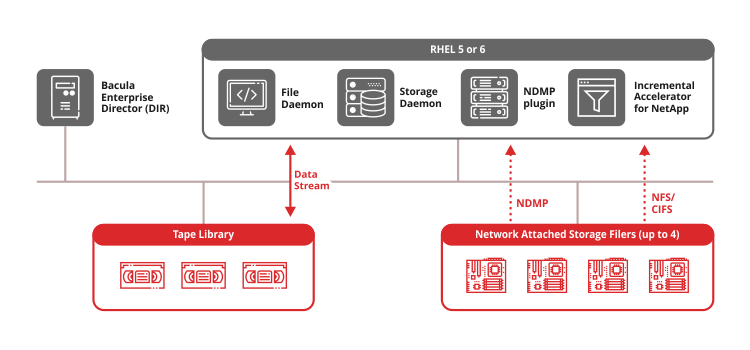
No. NDMP is a backup standard that the NAS itself has to support, and not every brand does. Bacula backs up any NAS over its network shares (NFS or SMB), the same way an office computer opens the files. For brands that do support NDMP, such as NetApp, HPE, EMC, and Huawei, Bacula’s NAS backup software includes the NDMP Plugin, which is faster for very large volumes.
Can I back up NAS systems from different vendors with one tool?
Yes. Bacula backs up Synology, NetApp, Nutanix, HPE, EMC, and Huawei storage from one console, under one set of schedules and retention rules. Synology’s built-in backup apps generally protect Synology devices only, and a second NAS brand would otherwise need a second backup tool.
Can I back up a NAS to tape?
Yes. Bacula reads the files on the NAS and writes the backup to disk, tape, as well as cloud storage. Tape suits long-term storage, and if you eject a tape and store it offline, attackers won’t be able to reach it during a breach.