FAQs
How do you back up a live MongoDB database without downtime?
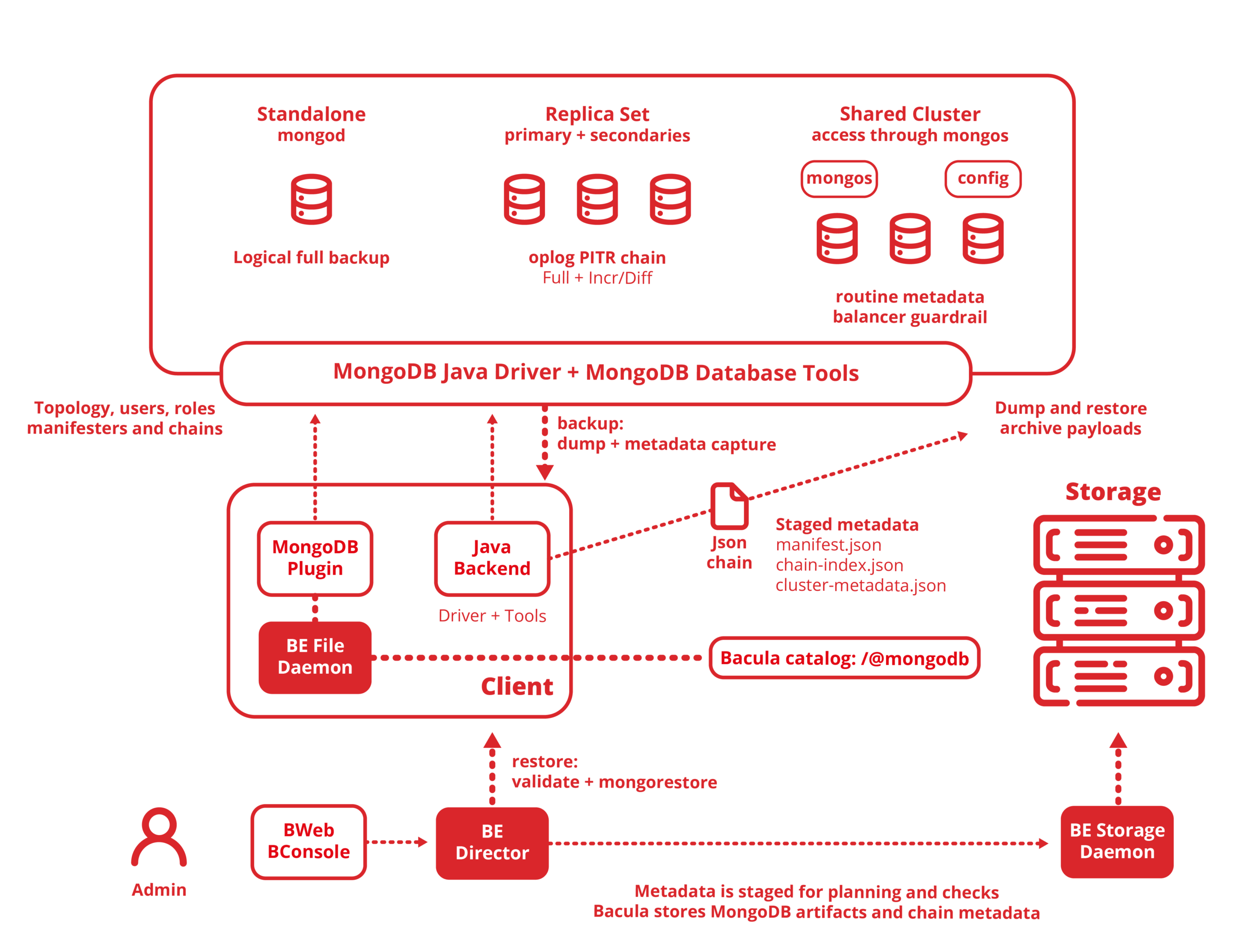
For standalone servers and replica sets, the Bacula Enterprise MongoDB Plugin drives mongodump against a live database without interrupting reads or writes, and the database stays fully operational throughout backup jobs. That said, the no-downtime guarantee doesn’t apply to sharded cluster backups since these backups require (1) stopping the chunk balancer via sh.stopBalancer(), (2) then disabling scheduled chunk migrations, and (3) preventing writes and schema transformations for the duration of the dump. Expect writes to be interrupted during the backup window. Back up the config server replica set first, then capture each shard replica set as close together in time as possible.
What is the difference between a logical and a physical backup in MongoDB?
A logical backup uses mongodump to export the database’s documents, indexes, and schemas into portable BSON archive files. These archives are independent of the underlying storage engine and can generally be restored to a different server, although cross-version restores depend on MongoDB version compatibility, Database Tools version, and Feature Compatibility Version (FCV). Thus, not every combination is guaranteed to work. A physical backup, on the other hand, copies the raw data files from disk, which is way faster for very large datasets but ties the artifact to the original storage engine and version.
How does point-in-time recovery work for MongoDB replica sets?
Point-in-time recovery is available exclusively for replica sets. When a restore is needed, the replay_to parameter stops oplog replay at any point within the available oplog window and recovers the replica set to the closest protected state within that window before an incident happens. Standalone servers and sharded clusters don’t support PITR through this plugin because they don’t provide an oplog recovery chain the same way replica sets do. If you need to recover a specific collection to a point in time, the recommended path is to restore the full replica-set chain into a non-production target first, then extract and reconcile the required data at the application level.
Can you restore a single MongoDB collection without recovering the entire database?
Yes. Bacula’s MongoDB Plugin supports database and collection-level include and exclude filters, so that a restore job can target a specific collection without touching the rest of the database. This keeps restore windows short and reins in the risk of overwriting healthy data alongside the damaged data that you need to replace. A full database restore is available when needed, but it’s never the only option.
Also, please note that granular collection-level restore applies to logical full artifacts and cannot be combined with oplog replay, meaning point-in-time recovery operates at full replica-set scope at all times. If you need both, make sure to restore the full replica-set chain into a non-production target first, then extract the required data at the application level.
Why use Bacula’s MongoDB Plugin instead of running mongodump manually?
mongodump on its own is a capable tool for a single logical export. That said, where it falls short is that it doesn’t give you everything (centralised scheduling, automated retention, checksum validation, recovery-chain metadata, and the list goes on)that comes after the dump. The Bacula Enterprise MongoDB Plugin wraps mongodump and mongorestore inside Bacula’s policy engine, so every MongoDB backup job is appropriately scheduled, catalogued, validated, and is recoverable from the same console that manages the rest of your infrastructure.