
How to Backup OpenShift? OpenShift Backup and Restore
Red Hat OpenShift’s container orchestration platform brings powerful capabilities for deploying and managing enterprise applications, but its distributed architecture and stateful workloads create complex data protection challenges. Traditional backup solutions struggle with OpenShift because they can’t efficiently protect etcd cluster state, persistent volume claims, and application configurations as unified recovery units. Container-native applications using StatefulSets require coordinated backup of both pod configurations and their associated persistent data.
Bacula Enterprise delivers purpose-built OpenShift backup through native Kubernetes API integration, protecting cluster resources, persistent volumes, and etcd data without installing agents in containers or modifying pod configurations. The solution handles everything from development clusters with dozens of pods to production infrastructures managing thousands of containers across multiple projects and namespaces, providing automated protection that works regardless of resource state or lifecycle stage.
Certified by Red Hat for platform compatibility, Bacula Enterprise provides enterprise-grade data protection that meets regulatory requirements while maintaining the speed and flexibility OpenShift users expect. Organizations need more than native export capabilities – they require encrypted backups, immutable storage, granular recovery options, and detailed audit trails for compliance frameworks.
OpenShift Backup with Volume-Independent Licensing
Bacula Enterprise protects Red Hat OpenShift environments through a fundamentally different pricing approach: licensing based on infrastructure rather than data volume. Unlike competing solutions where costs escalate as persistent volume usage grows, Bacula’s pricing structure remains stable regardless of storage consumption. This economic model delivers exceptional value for organizations running data-intensive containerized applications and Managed Service Providers hosting OpenShift infrastructure for multiple clients, allowing unlimited expansion of persistent volume claims, projects, and namespaces without triggering license cost increases.
Bacula Enterprise for OpenShift: Rich in Features
Bacula Enterprise provides enterprise-grade OpenShift environment backup with comprehensive automation for both OpenShift Container Storage and Red Hat OpenShift Container Platform. The technology protects cluster resources, persistent volumes, and etcd state through native Kubernetes API integration.
Primary features of Bacula’s Red Hat OpenShift module:
- Quick and effective redeployment of cluster resources
- Configurations that can be saved and utilized with other operations
- Application recovery with their persistent data
- Amended config tasked with restoring systems in an identical state to the previous one
- OpenShift cluster state safeguarding capabilities
- Choice between a command line and a Web GUI for single pane management of backup and restore operations for IT environments of any size
- Kubernetes Persistent Volumes data restoration to local directories, etc.
Bacula believes that restoring and upgrading clusters needs to be a relatively normal, reliable and easy process for people working with OpenShift. It is also important that backup and recovery is performed the way that you need it, not by a different method that is dictated by a software vendor. Bacula modularity and features provide a range of different approaches, to give you the flexibility you need for your IT environment.
Bacula’s module for Red Hat OpenShift gives Devops teams the ability to automate the entire backup and recovery process and minimize the amount of action needed. The value of this is clear, for example, in the situation of an unscheduled restore. This typically allows a drastic decrease in production interruptions. Bacula Systems knows that both the speed and the efficiency of a recovery are extremely important for all businesses, including within a highly sophisticated and resilient container-based environment.
The Red Hat OpenShift backup module safeguards your critical data. It is also powerful for:
- OpenShift cluster migration
- Environment replication
- Disaster recovery planning
- Extensive security and separation of duties from the code repository and the cluster automation tools
Protected OpenShift Resources
Bacula Enterprise protects the complete spectrum of OpenShift objects:
- Workload Resources – Deployments, StatefulSets, DaemonSets, ReplicaSets, Pods, Pod Templates, Jobs
- Storage – Storage Classes, Volume Snapshot Classes, Persistent Volumes, Persistent Volume Claims and their data/content
- Configuration – ConfigMaps, Secrets, ServiceAccounts, Resource Quotas, Limit Ranges
- Networking – Services, Endpoints, Routes
- Infrastructure – Namespaces, Projects, Role Bindings
Why Backup OpenShift Environments?
The increasing number of Red Hat OpenShift deployments in a production environment naturally brings up the question of security, backup, recovery, compliance and other issues with data management. Stateful applications require persistent data to function, and this application data requires protection through automated backups, encryption, and off-site replication.
Organizations deploying OpenShift in production require backup and recovery capabilities for OpenShift as soon as they start working with it, so that they can safely work with both stateful data and deployed environments without worrying about losing all of their information because of a data corruption accident or something similar.
Bacula Enterprise provides enterprise-grade OpenShift backup through native API integration, protecting both OpenShift Container Storage and Red Hat OpenShift Container Platform with comprehensive automation. This means that not only can Bacula deliver comprehensive backup for OpenShift, but for an organization’s entire IT department, regardless of whether it consists of physical, hybrid cloud, or virtual elements. This leads to Bacula providing a ‘single pane’ viewpoint across all protected data, thereby increasing simplicity and significantly reducing costs (one reason for this is that Bacula does not charge by data volume).
The very nature of OpenShift embraces both flexibility and modularity, allowing for many different operations such as persistent volume migration, among others. This kind of seamless migration allows a lot of companies to successfully avoid vendor lock-in, while reducing complexity of their systems, reducing costs, and so on.
The ease with which Bacula handles data migration, combined with its Hybrid Cloud capabilities allows companies to efficiently move from one cloud to another – or implement Hybrid Cloud solutions with parallel, integrated or complementary tasks.

OpenShift Backup and Restore Module Benefits
Agentless Protection
- Native API Integration – Protects OpenShift resources through Kubernetes API without installing backup agents inside container images or modifying pod specifications
- No Container Modifications – Backs up applications without requiring code changes, container rebuilds, or deployment configuration adjustments
- Automatic Resource Coverage – New pods, services, and persistent volumes matching backup criteria receive protection automatically without manual job configuration
Comprehensive Cluster Capture
- Complete Resource State – Captures all Openshift objects and etcd cluster data as unified backup sets
- CSI Snapshot Integration – Leverages OpenShift Container Storage (OCS) snapshots through Container Storage Interface for efficient volume backup, replication, and migration
- Application-Aware Protection – Protects complete applications including all Kubernetes resources and persistent data required for functional recovery
- Configuration Preservation – Saves modified configurations to enable restoration to identical previous states with enhanced security and compliance
Flexible Recovery Options
- Cluster Resource Redeployment – Rapidly recreates OpenShift resources including Deployments, StatefulSets, Services, and Routes from backup with complete dependency preservation
- Persistent Volume Restore – Recovers volume data either back to OpenShift cluster or exports to local directories for offline analysis and testing
- Dual Management Interfaces – Control backup and recovery operations through graphical BWeb console or bconsole command-line tools for scriptable automation
- Cross-Environment Recovery – Deploy restored resources to different OpenShift clusters for disaster recovery, migration, or environment cloning scenarios
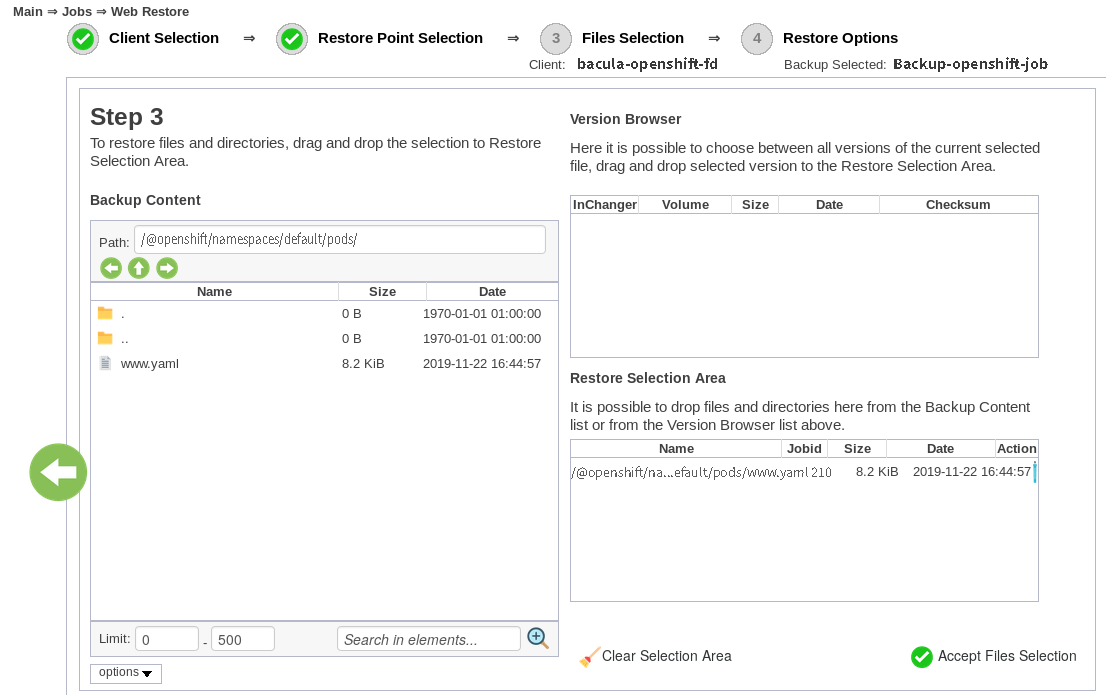
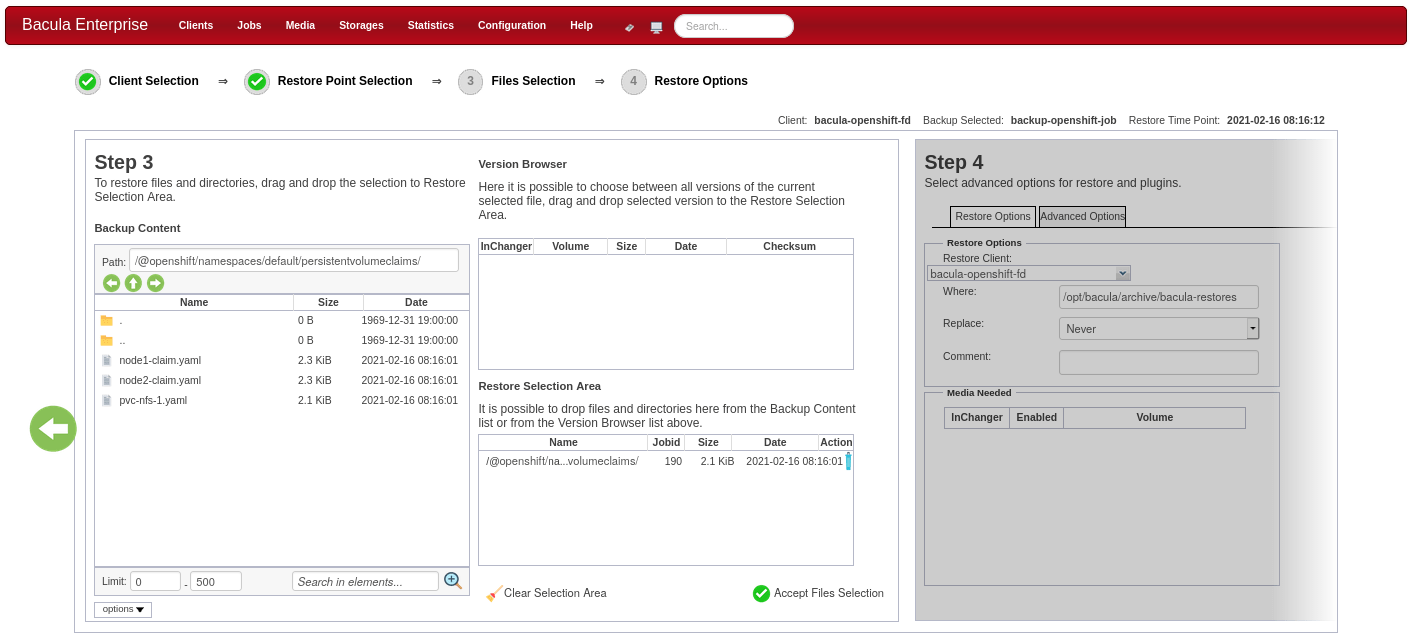
OpenShift Restore Process
The OpenShift backup module provides flexible restore options to support different recovery scenarios. Organizations can choose between two restore destinations based on their specific needs:
- Restore to a Kubernetes/OpenShift Cluster – Loads backed-up resources directly into an OpenShift or Kubernetes cluster, automatically recreating pods, services, persistent volumes, and configurations. This approach enables rapid disaster recovery by restoring complete applications to production or test environments with minimal manual intervention.
- Restore to Local Directory – Exports backup data to the local filesystem for offline analysis, verification, or manual processing. This option supports scenarios where administrators need to inspect configurations before deployment, migrate resources between incompatible cluster versions, or extract specific data without affecting running environments.
For best practice backup and recovery of OpenShift containers, apps and data need to have automatic back up. Back-up environments need to be regularly tested by system administrators to ensure that everything will work as expected when a restore is required. Organizations should document restore procedures and verify that recovery time objectives can be met under actual failure conditions.
Resource Listing Feature for Kubernetes or OpenShift Backup
The Bacula Enterprise OpenShift module includes resource discovery capabilities that help administrators plan and configure backup operations. Before creating backup jobs, administrators can query the OpenShift environment to inventory available resources and understand the cluster structure.
The listing feature provides information about Kubernetes resources including:
- A list of all cluster resources like namespaces, cluster roles, persistent volumes, storage classes, etc.
- A list of all namespaced resources. Displays all resources belongs to a namespace like pods, services, pvcs, etc
The feature employs the .ls call with a plugin=<plugin> command parameter. The capability enables administrators to verify connectivity to the OpenShift environment, confirm resource visibility before backup execution, and make informed decisions about backup scope and job configuration. Resource listing eliminates guesswork by providing accurate current state information directly from the Kubernetes API.
Enterprise Platform Capabilities
The OpenShift backup module operates within Bacula Enterprise’s comprehensive data protection platform. All capabilities described in this section are platform-wide features available across every Bacula deployment, including OpenShift environments.
Storage Efficiency & Infrastructure
Bacula Enterprise optimizes storage utilization through intelligent data reduction and flexible destination options:
- Deduplication at Block Level – Eliminates redundant data blocks across all backups, preserving each unique block only once regardless of how many backup sets contain it
- Configurable Compression – Applies compression algorithms that balance storage savings against CPU overhead based on data types and infrastructure capabilities
- Perpetual Incremental Backups – Captures only changed data after initial full backup, eliminating recurring full backup requirements and reducing storage consumption
- Sparse File Handling – Processes sparse files efficiently by backing up only allocated blocks rather than empty space within files
- Network-Efficient Operations – Transfers only modified data between backup cycles, minimizing bandwidth consumption across WAN connections
- Diverse Storage Destinations – Writes backups to local disk arrays, network storage systems, cloud object storage platforms, tape libraries, or combined configurations
- Storage Migration Capabilities – Enables backup movement between storage tiers through configurable policies based on age, retention requirements, or custom criteria
- S3 Protocol Compatibility – Integrates with any S3-compatible storage provider for scalable, economical long-term data retention
Security & Regulatory Compliance
Enterprise security and compliance capabilities are integrated throughout the platform:
- AES-256 Encryption – Secures data from source through network transit to storage with flexible key management and administration options
- Write-Once Storage Integration – Prevents backup modification or deletion through WORM storage compatibility, defending against ransomware and insider threats
- Role-Based Access Management – Restricts user permissions to specific backup jobs, restore operations, and administrative functions based on organizational requirements
- Comprehensive Audit Logging – Records every backup, restore, and configuration modification with timestamps and user attribution for compliance reporting and forensic analysis
- Compliance Framework Support – Provides features addressing requirements from GDPR, HIPAA, SOC 2, and industry-specific regulations through retention controls, encryption, and audit capabilities
- Client-Side Encryption Support – Allows data encryption at source before transmission to backup infrastructure for enhanced privacy protection
Recovery & Operational Continuity
Comprehensive restore capabilities ensure rapid recovery from any data loss scenario:
- Complete System Recovery – Rebuilds entire servers including operating system, applications, configurations, and data without manual OS installation or application setup
- Cross-Platform Data Mobility – Extracts and restores data between different operating systems, enabling migrations and providing flexibility during recovery operations
- Geographic Replication – Copies backups automatically to remote locations for site-level disaster protection and distributed recovery point availability
- High-Frequency Protection – Supports backup intervals measured in minutes rather than hours for applications requiring minimal recovery point objectives
- Integrity Verification Capabilities – Verify backup recoverability and data integrity through catalog checks and configurable test restore operations
Economic Model
Bacula Enterprise’s licensing approach eliminates capacity-based pricing constraints:
- Capacity-Agnostic Licensing – Infrastructure growth doesn’t trigger license cost increases, enabling unlimited data protection expansion without budget impact
- Predictable Cost Structure – Straightforward pricing prevents budget surprises as infrastructure scales or data volumes fluctuate over time
- Workload-Independent Pricing – Pod counts, persistent volume sizes, project quantities, and storage consumption don’t affect licensing costs
- Large-Scale Economics – Organizations protecting substantial or rapidly growing data volumes realize increasingly significant cost advantages over capacity-priced alternatives
- Service Provider Flexibility – MSPs can deliver enterprise backup capabilities while maintaining healthy margins unconstrained by client data growth
Management & Operational Control
Centralized management capabilities provide visibility and control across backup operations:
- Dual Management Interfaces – Choose between graphical web console for visual management and fully-featured command-line tools for automation and scripting
- Multi-Tenant Architecture – Service providers and large enterprises can create isolated environments with independent configurations, branding, and administrative boundaries
- Extensive Reporting Capabilities – Generate backup status reports, storage consumption analysis, compliance documentation, and performance metrics with scheduled delivery options
- Third-Party Integration – Connect with monitoring platforms, ticketing systems, and identity providers for unified IT operations and authentication
- Automatic Infrastructure Discovery – Detect and inventory backup targets across the environment with query capabilities for planning and verification
- Performance Tuning Controls – Adjust concurrency levels, bandwidth limits, and resource allocation to balance backup speed against production system impact
- Unlimited Scale Architecture – Supports environments from single servers to thousands of systems under centralized management with distributed execution
Frequently Asked Questions
What OpenShift components does Bacula protect beyond persistent volumes?
Bacula captures the complete OpenShift environment including Routes for external access, Projects for tenant isolation, Security Context Constraints, image streams from the integrated registry, and BuildConfigs for CI/CD pipelines. The backup process also protects ConfigMaps, Secrets, ServiceAccounts, RoleBindings, and custom resource definitions that applications depend on. This comprehensive approach ensures restored clusters contain all platform-specific configurations required for applications to function correctly.
Do I need to stop my StatefulSet applications before backing them up?
No downtime or application is required because Bacula uses CSI snapshots to capture consistent point-in-time copies of persistent volumes while pods continue processing requests. The snapshot-based approach preserves data integrity for databases, message queues, and other stateful workloads, and Bacula also has several mechanisms to perform quiescing correctly in order to guarantee data integrity by hand if needed. Applications experience no performance impact during backup operations.
If my OpenShift cluster fails completely, what’s the recovery process?
Recovery begins by restoring etcd state and cluster resource definitions to a new or rebuilt OpenShift cluster, re-establishing the platform foundation. Bacula then recreates Projects, deploys application resources including Deployments and StatefulSets, and restores persistent volume data to new PersistentVolumeClaims. The process can target identical infrastructure for disaster recovery or different clusters for migration, with administrators controlling whether resources deploy automatically or remain available for manual verification.
Does Bacula’s Red Hat certification matter for backup?
Red Hat certification ensures Bacula correctly handles OpenShift-specific resources like Routes, Security Context Constraints, and the integrated image registry that generic Kubernetes tools might ignore or mishandle. Certified solutions undergo testing against OpenShift’s complete feature set including platform updates and API changes across versions. Using certified backup software reduces risk of incomplete protection and ensures support compatibility when issues arise.
How does backup work for applications using OpenShift Container Storage?
Bacula integrates with OpenShift Container Storage through the Container Storage Interface, leveraging OCS’s native snapshot capabilities for efficient volume protection. CSI snapshots capture storage state without copying entire volumes, dramatically reducing backup windows and storage consumption for large persistent volume claims. The snapshot-based approach also enables rapid restore operations and supports advanced scenarios like cross-cluster volume migration.
Further help on OpenShift backup:
- Looking for implementation details? See the complete OpenShift Plugin documentation.
- Need to see all our backup solutions? Full hypervisor and database support.
- Our server backup solutions include tools for Windows, Linux and more.
- View Bacula Enterprise data backup and recovery program features.
- Does Bacula support your storage type? Take a look at our storage backup solutions.
- Read our vision on flexible and scalable backup software systems.
You may also be interested in:

