
Chat with us, powered by LiveChat
Home > Corporate Data Backup > Enterprise Data Backup Tools > SAN Shared Tape Library Solution from Bacula Systems

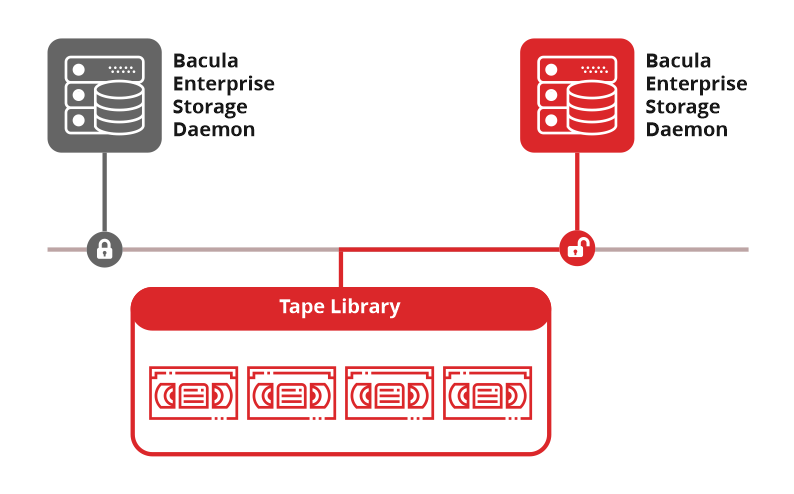
A SAN (Storage Area Network) links servers directly to tape storage over dedicated and low-latency channels, thus offloading heavy backup traffic from your local network. That said, given that a shared SAN environment allows multiple servers to access tape drives, organisations risk scrambling and corrupting the tape because a tape drive can only take write instructions from one server at a time.

Bacula Enterprise’s dedicated SAN module plugin shstore uses the SPC-3 SCSI protocol to prevent accidental corruption of tape volumes by compartmentalising storage daemon jobs to prevent these overlaps. When a Bacula storage daemon starts a job, it places an exclusive hardware lock on the tape drive, and any other server requesting access to it has to queue until the job completes and the lock releases.

Through this mechanism, your organisation can share expensive tape infrastructure across multiple servers and maximise backup speeds over a SAN fabric, along with preventing the write conflicts that cause data corruption
Benefits of Bacula’s SAN Shared Tape Library Module

  • Higher Tape Library and Autoloader Utilisation – Storage Daemons across the environment can share the same tape library or autoloader. This, in turn, reduces the time drives sit idle outside a particular server’s backup window and lets other backup jobs use them.
  • Shorter Backup Windows – Storage Daemons send data to tape over the SAN instead of the LAN. As a result, this process reduces competition for network bandwidth with application and user traffic and can shorten backup times.
  • Reservations That Survive Path FailuresSPC-3 persistent reservations allow the Storage Daemon’s reservation on a shared tape drive to survive a SAN error-recovery reset, as long as that type of reset is supported. This helps maintain exclusive access to the drive during a multipath failover, when traffic switches to an alternate path.
  • Automatic Lock Release Between Jobs – The module releases the tape drive as soon as a job finishes. The next Storage Daemon can then claim the drive without requiring an administrator to release the lock manually.

Key Features of Bacula’s SAN Shared Tape Library Module

Drive Locking and Tracking Mechanics

  • Multi-Server Device Sharing – Multiple Bacula Storage Daemons can access the same physical tape library without overlapping writes. The Shared Storage plugin uses persistent reservations to ensure that a tape drive is exclusively accessed by only one Storage Daemon at a time. As that rule applies per drive, different Storage Daemons can use different drives concurrently, when the Bacula storage and autochanger configuration permits it.
  • SPC-3 Drive Locking – The module uses the SPC-3 SCSI persistent reservation protocol to manage which server can write to a tape drive at any given time.
  • Per-Daemon Reservation Keys – Each Storage Daemon registers with a unique key in storage-ctl.conf, which lets a reservation on a tape drive be traced back to the specific Storage Daemon that holds it.

Reservation Management Commands

  • Built-In Reservation Visibility – Administrators can use Bacula’s status command to view the reservation state of shared tape drives, including which Storage Daemon or job is using or waiting for a drive. Additional diagnostic utilities, storage-ctl query, regkeys, and wholocked, are available for investigating persistent or orphaned reservations when required.
  • Manual Recovery Commands for Stale Locks – The storage-ctl script exposes query, clear, regkeys, and wholocked commands. If a Storage Daemon exits abnormally and leaves a stale lock behind, an administrator can use these same commands to inspect the reservation and forcibly clear it, in order to free the drive for another Storage Daemon to use.
  • Drive Reservation for Restores – By setting AutoSelect to ‘no’ on a specific drive excludes it from an autochanger’s normal selection pool. That drive then stays reserved for restore jobs instead of competing with backups for it.

Platform and Version Support

  • Supported Operating Systems – The shstore package installs on RedHat Enterprise, Ubuntu LTS, and Debian through rpm, dpkg, or a site’s existing apt or yum repository. Notably, a Solaris package may be available on request, but it isn’t currently implemented.
  • SPC-3 Requirement – The tape library requires SPC-3 protocol support. The legacy SPC-2 SCSI reserve doesn’t work with this module anymore.
  • sg3_utils Dependency – Every machine running a Storage Daemon needs the sg3_utils package installed. It supplies sg_persist, the underlying tool storage-ctl relies on to place and clear SPC-3 reservations.

How Does Bacula Defend Backup Data From Cyberthreats in a SAN Environment?

To combat cybercriminals and protect organisations from ransomware, Bacula Enterprise secures SAN shared tape libraries by integrating directly with WORM-compliant and immutable storage targets, so as to prevent a credential-holding attacker from modifying, relabelling, or, even worse, erasing data until the configured retention period expires.

Architecture and Access Control

  • Isolated, Five-Module Architecture – In Bacula’s five-module architecture, wherein the File Daemon (client), Director, Storage Daemon, Console, and Catalog database operate independently, the compromise of a single component cannot reach and infect the remaining four.
  • Restricted File Daemon (Client) Privileges – Administrators can limit exactly which directories a client can back up from, restore to, and run scripts in, through the AllowedBackupDirectories, AllowedRestoreDirectories, and AllowedScriptDirectories directives. The File Daemon can also run in read-only mode, in order to prevent any unauthorised modification from that system.
  • Role-Based Access Control – Bacula supports granular Role-Based Access Control (RBAC) through specialised Access Control Lists (ACLs) that precisely restrict what a console user can see and modify. This security is enforced across the JobACL, CommandACL, PoolACL and ScheduleACL control layers.
  • Multi-Factor Authentication – Console access supports TOTP-based MFA, and is compliant with RFC 6238, alongside standard password and TLS authentication. Web GUI access separately supports one-time password authentication that also includes biometric smartphone validation options.

Immutability and Data Integrity

  • Append-Only and Immutable Volumes – Bacula sets an Append-Only attribute on file-based volumes during their first backup job, in order to prevent data loss from overwriting. Once a volume’s marked Full, an Immutable flag can prevent it from being relabelled or reused until its protection period elapses.
  • Enterprise Storage Immutability Integration – Bacula integrates with immutability features on NetApp SnapLock, DataDomain RetentionLock, and HPE StoreOnce, as well as native WORM tape and object-lock features on AWS S3, Azure, and Google Cloud Storage.
  • Verify Jobs and Hash-Based Integrity Checking – Bacula can detect silent corruption or unauthorised modification by computing MD5, SHA1, SHA256, or SHA512 signatures of file data and compare a volume’s current state against its Catalog record.
  • Registration Doesn’t Grant Access – A Storage Daemon registers its key with a tape drive without that registration granting it any write access. Only the one key currently holding the reservation can write to the device, even while other keys sit registered and known to it.
  • Locking Uses the Strictest SPC-3 Reservation Type – The reservation Bacula places on a tape drive is type Exclusive Access, confirmed directly in the module’s own status output. SPC-3 defines several reservation types with different sharing rules, and Exclusive Access grants sole use of the device to one registered key at a time.

Encryption

  • Encrypted Communications – CRAM-MD5 authentication is used between Bacula daemons, while TLS encryption can be enabled for network communications across the environment.
  • FIPS 140-3 Compliance – Bacula Enterprise supports FIPS 140-3 compliance through its Cryptographic Module, which uses OpenSSL-FIPS and is certified across multiple platforms. The module can be used across Bacula components.
  • Data-at-Rest Encryption – The Storage Daemon can encrypt an entire storage target at once, regardless of the data source. Administrators can also configure encryption separately for individual clients.

Threat Detection

  • BGuardian Ransomware Detection – Bacula’s automated security analysis module, BGuardian, checks configuration strength, encryption usage, backup poisoning patterns, and dozens of other hardening indicators across the environment, generating reports and persistent alerts as issues are detected.
  • Malware and Antivirus Scanning -Bacula provides automated threat defence by integrating an Antivirus Plugin with ClamAV to scan backed-up files for viruses during post-backup Verify jobs.

What Do You Get When You Deploy Bacula Enterprise?

Every Bacula Enterprise deployment brings you the following features across recovery, backup, pricing, and platform administration.

Efficient Backups Capabilities

  • Adaptive Compression – Compression algorithms are configurable per job so that administrators can tune compression based on data type and available resources.
  • Full, Differential, and Incremental Backups – Bacula supports Full, Differential, and Incremental backup levels. A typical strategy starts with one Full backup, followed by Incremental backups, which avoids repeatedly running large Full backups on a fixed schedule.
  • Progressive Virtual Full Backups – Bacula can combine an existing Full backup with its subsequent Incrementals to create a new synthetic Full without contacting the client again. The process reads data from existing backup storage instead. The Backups To Keep directive can repeat this consolidation on a rolling basis.
  • Spooling to Disk Before Tape Writes – Bacula can write backup data to a disk spool before sending it to tape as a continuous stream. This helps prevent the start-and-stop tape movement that can occur when data arrives too slowly to keep the drive writing continuously. The issue is particularly common with Incremental and Differential backups, which tend to produce smaller and less consistent data streams than Full backups.
  • Bandwidth-Conscious Transfers – Only changed data is transferred over the network after the initial backup. This keeps network traffic lower without requiring manual bandwidth throttling or scheduling workarounds.
  • Frequent Backup Scheduling – Backup jobs can run every few minutes instead of once a day, cutting the potential data loss window from hours to minutes.
  • Continuous Data Protection – The cdp-client application monitors files for changes and copies them to a spool directory as they occur. The FileDaemon then sends that data to a regular Bacula backup job at set intervals, so changes can be captured within seconds or minutes rather than waiting for the next scheduled backup.

Ultra-Fast Recovery Capabilities

  • System-Level Bare-Metal Restore – Bacula Enterprise can recover an entire server, including the operating system, applications, configuration, and data, without requiring a manual OS installation first.
  • Cross-Platform Data Recovery – Backup data can be recovered to a different operating system from the original. This gives teams more flexibility during hardware replacements, migrations, or other recovery scenarios.
  • Automated Restore Validation – Automated testing can verify that backup data is recoverable without requiring an administrator to run a separate validation process.
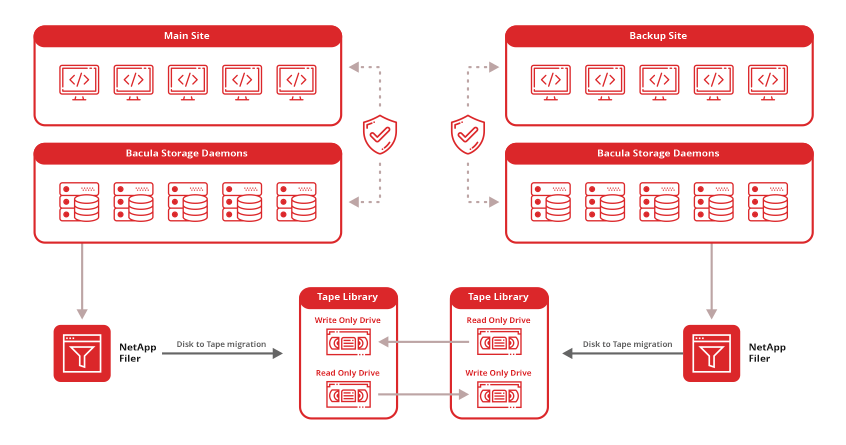
  • Geographic Backup Replication – Bacula keeps a single backup copy by default. To create additional copies in other locations, administrators can configure Copy or Migration Jobs. A typical setup might keep the primary copy on local storage, create a second copy on another media type such as cloud storage, and then send a third copy to an offsite or air-gapped location. This setup helps ensure that a site-wide outage does not take out every available recovery copy.

Security and Compliance

  • Complete Activity Auditing – Every backup, restore, and configuration change is logged with user identity and timestamp. Compliance and security teams get a full, unbroken audit trail.
  • Regulatory Framework Support – Platform controls map to GDPR, HIPAA, and SOC 2 requirements through encryption, configurable retention policies, and detailed audit logs.
  • Privacy-Preserving Architectures – Zero-knowledge deployment encrypts the data so that even the administrator running the backup can’t read it. They can manage the backup, but they can’t see the files themselves.

Cost Control and Predictable Backup Licensing

  • Block-Level Deduplication – Repeated data blocks are stored only once across the backup catalogue, which cuts storage consumption without requiring changes to backup policies or schedules.
  • Tiered Storage Workflows – Backup data can move between storage tiers automatically as it ages. Recent recovery points can stay on faster storage, while older backups move to lower-cost destinations.
  • Volume-Independent Licensing – Licensing costs do not rise as protected data grows. Teams can expand their backup environment without taking on higher licence fees.
  • Predictable Costs – Fixed pricing makes infrastructure budgets easier to plan, with no variable licensing charges tied to storage growth or workload changes.
  • Workload-Agnostic Pricing – The size of databases, number of servers, and amount of protected storage do not affect licensing costs.
  • Lower Costs at Scale – Large or fast-growing SAN environments can add protected data without increasing licence fees. The savings can become more significant as data volumes grow compared with capacity-based licensing models.

Backup Management and Administration

  • Dual Interface BWeb provides a graphical console for day-to-day job management and monitoring. Bconsole (user agent) gives operators full command-line control for scripting, automation, and advanced configuration.
  • Scalability Without Limits – The same platform architecture manages environments from a handful of servers to deployments numbering in the thousands, all under a single management plane.
  • Automatic Resource Discovery – The platform scans infrastructure to identify and catalogue backup targets automatically. Protection coverage stays current as the environment grows.
  • Detailed Reporting – Scheduled reports cover job outcomes, capacity trends, compliance status, and operational performance on a defined cadence.
  • External System Integration – Bacula connects to monitoring tools, IT ticketing systems, and directory services, without any mandatory custom development.

Frequently Asked Questions

1) What is SAN?

SAN stands for storage area network. It’s a dedicated network that carries block-level storage commands between servers and storage hardware, such as disk arrays and tape libraries. To a server, a SAN device works much like a drive connected directly to it, instead of a shared folder accessed over a standard network.

2) Can Bacula Enterprise back up and recover a SAN-shared tape library?

Yes. Bacula Enterprise’s SAN Shared Storage module, which uses the shstore plugin, lets two or more Storage Daemons share a single physical tape library or autochanger. It uses SPC-3 SCSI persistent reservations to lock each drive to one Storage Daemon at a time. This lets multiple servers use the same tape hardware without interfering with each other’s jobs.

3) Can two servers write to the same tape drive at the same time?

No. SPC-3 persistent reservations allow only one Storage Daemon to hold a lock on a drive at any given time. If another Storage Daemon requests the same drive, it waits until the current job finishes and the lock is released.

4) What happens if a Storage Daemon crashes while holding a tape lock?

In most cases, the lock is released automatically when the Bacula component exits. The exception is an abrupt termination, such as a kill -9, or an operating system crash. In those cases, the lock may remain in place. An administrator can then clear it manually with the clear command in the storage-ctl script.

5) Which operating systems does Bacula’s SAN Shared Tape Library module support?

The module currently supports Red Hat Enterprise Linux and Ubuntu LTS. A Solaris package may be available on request, but Solaris support has not yet been implemented.


(63 votes, average: 5.00 out of 5)